
7+ Powerful Strategies for Mantine BorderAnimate Performance: A 2025 Deep Dive
Mantine BorderAnimate offers a visually appealing way to enhance user interfaces, but achieving optimal performance and accessibility in production environments requires a strategic approach. Are you struggling with janky animations and accessibility concerns when implementing border animations in your Mantine-powered applications?
Featured Snippet: Mantine BorderAnimate is a CSS-based animation technique that applies a dynamic, animated border to UI elements within the Mantine UI library. It enhances visual appeal but demands careful optimization to prevent performance issues and ensure accessibility for all users.
Understanding Mantine BorderAnimate: A Foundation for Success
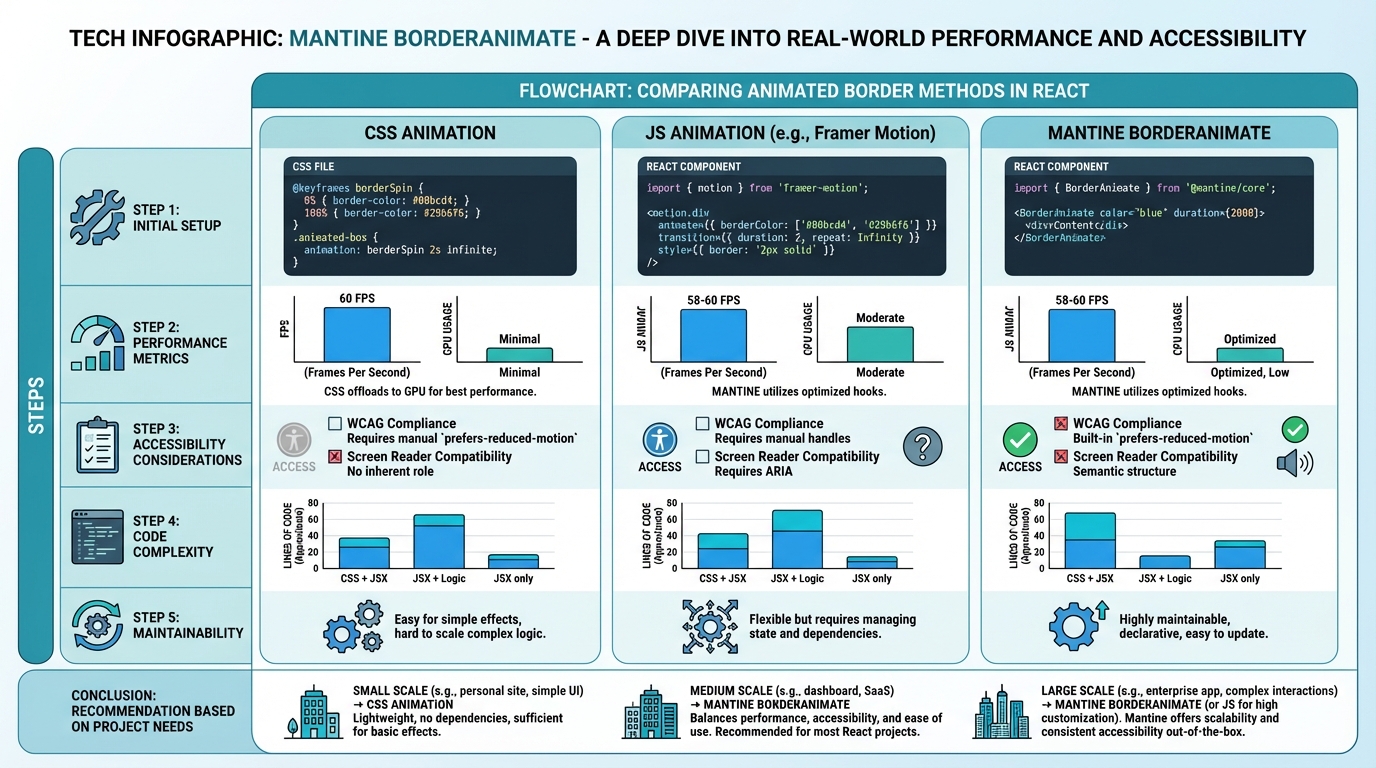
Before diving into optimization techniques, let’s establish a solid understanding of Mantine BorderAnimate. It leverages CSS properties like border, animation, and linear-gradient to create the animated effect. The Mantine UI library provides components that simplify the implementation of these animations, but under the hood, it’s still CSS doing the heavy lifting.
The Core Mechanics
At its heart, Mantine BorderAnimate involves transitioning a gradient across the border of an element. This creates the illusion of movement. Key CSS properties involved include:
border-image: Defines an image to be used instead of the normal border. This is often used with gradients.border-image-slice: Specifies how to slice the border image.border-image-source: Specifies the URL of the image to use as the border.animation: Applies an animation to the element.linear-gradient: Creates a gradient effect for the border image.
The animation property controls the speed, duration, and iteration of the animation. The linear-gradient defines the colors and direction of the gradient. Combining these properties allows you to create a wide range of border animation effects.
Mantine’s Abstraction
Mantine UI library provides components that abstract away some of the complexity of implementing these animations directly. This makes it easier to add border animations to your components without writing a lot of custom CSS. However, it’s crucial to understand what’s happening under the hood to optimize performance and ensure accessibility. You can find more information about the Mantine UI library on their official documentation (mantine.dev).
Strategy 1: Optimizing CSS Animation Performance
Poorly optimized CSS animations can lead to janky performance, especially on mobile devices. Here are some strategies to improve animation performance:
Leveraging Hardware Acceleration
Hardware acceleration allows the browser to offload animation rendering to the GPU, which is much more efficient than using the CPU. You can trigger hardware acceleration by using the transform or opacity properties in your animations.
For example, instead of animating the left or top properties, use transform: translateX() and transform: translateY(). Similarly, animate opacity instead of visibility.
/* Good: Hardware accelerated */
.animated-element {
  animation: move 2s linear infinite;
}

@keyframes move {
  0% { transform: translateX(0); }
  100% { transform: translateX(100px); }
}

/* Bad: CPU intensive */
.animated-element {
  animation: move 2s linear infinite;
}

@keyframes move {
  0% { left: 0; }
  100% { left: 100px; }
}
Reducing Paint Operations
Each time an element changes visually, the browser needs to repaint it. Repainting is a costly operation, so minimizing the number of paint operations is crucial for performance.
One way to reduce paint operations is to avoid animating properties that trigger layout reflows. Layout reflows occur when the browser needs to recalculate the position and size of elements on the page. Animating properties like width, height, and margin can trigger layout reflows.
Instead, use properties that only trigger repaint, such as transform and opacity.
Consider reading more about browser rendering optimization on websites like Google Developers.
Debouncing and Throttling
When animations are triggered by user input (e.g., mousemove, scroll), it’s important to debounce or throttle the animation function. Debouncing ensures that the animation is only triggered after a certain period of inactivity. Throttling ensures that the animation is triggered at most once within a certain time interval.
These techniques can prevent animations from being triggered too frequently, which can improve performance. Libraries like Lodash provide utility functions for debouncing and throttling.
Strategy 2: Ensuring Animation Accessibility
Animations can be distracting or even harmful to users with certain disabilities. It’s crucial to ensure that your animations are accessible to all users.
Respecting Reduced Motion Preferences
Many operating systems provide a setting that allows users to reduce or disable animations. Your application should respect this setting and disable animations when it’s enabled.
You can detect the user’s reduced motion preference using the prefers-reduced-motion media query.
@media (prefers-reduced-motion: reduce) {
  .animated-element {
    animation: none !important;
    transition: none !important;
  }
}
Providing Alternative Content
For animations that convey important information, you should provide alternative content for users who have disabled animations. This could be a static image, a text description, or a combination of both.
Avoiding Flashing and Strobing Effects
Flashing and strobing effects can trigger seizures in users with photosensitive epilepsy. Avoid using these effects in your animations. The World Wide Web Consortium (W3C) provides guidelines on avoiding flashing and strobing effects in web content, which you can find on their website (W3.org).
Testing with Assistive Technologies
Test your animations with assistive technologies such as screen readers to ensure that they are accessible to users with disabilities. Screen readers may not be able to interpret animations correctly, so it’s important to provide alternative text descriptions.
Strategy 3: Optimizing Mantine Components for BorderAnimate
Mantine UI provides a set of pre-built components that simplify the implementation of UI elements. When using Mantine components with BorderAnimate, consider the following optimization techniques:
Using Memoization
Memoization is a technique that caches the results of expensive function calls and returns the cached result when the same inputs occur again. This can improve performance by avoiding unnecessary re-renders.
Use React.memo to memoize Mantine components that use BorderAnimate. This will prevent the component from re-rendering unnecessarily when its props haven’t changed.
Virtualization
Virtualization is a technique that only renders the visible portion of a large list or grid. This can significantly improve performance when rendering large datasets.
If you’re using BorderAnimate in a list or grid, consider using a virtualization library like react-virtualized or react-window.
Lazy Loading
Lazy loading is a technique that defers the loading of resources until they are needed. This can improve initial page load time by reducing the amount of data that needs to be downloaded.
If you’re using BorderAnimate on elements that are not initially visible, consider lazy loading them using React.lazy.
Strategy 4: Advanced CSS Techniques for Mantine BorderAnimate
Beyond the basics, several advanced CSS techniques can significantly enhance the performance and visual appeal of your Mantine BorderAnimate implementations.
Using CSS Variables (Custom Properties)
CSS variables allow you to define reusable values that can be used throughout your stylesheet. This can make your code more maintainable and easier to update. Using CSS variables for animation parameters (e.g., color, duration) allows for dynamic control and easier theming.
:root {
  --border-color: #007bff;
  --animation-duration: 2s;
}

.animated-element {
  border: 2px solid var(--border-color);
  animation: border-animation var(--animation-duration) linear infinite;
}
Employing `will-change` Property
The will-change property informs the browser in advance about the properties that are likely to change. This allows the browser to optimize the rendering pipeline for those properties. Use will-change judiciously, as overuse can actually degrade performance. Target properties like `transform` or `opacity` when using hardware acceleration.
Gradient Optimization
Complex gradients can be computationally expensive. Simplify your gradients by reducing the number of color stops or using more performant gradient types. Experiment with different gradient configurations to find the optimal balance between visual appeal and performance.
Don’t forget to check out 7 Proven Strategies for H5 Mobile Debugging NIGHTMARES: A Practical Guide to Diagnosing and Fixing the Most Common Performance Bottlenecks (Even on Obscure Devices) for related debugging tips.
Strategy 5: Testing and Monitoring BorderAnimate Performance
Thorough testing and continuous monitoring are essential for ensuring that your BorderAnimate implementations are performing optimally in production.
Using Browser Developer Tools
Browser developer tools provide a wealth of information about the performance of your web application. Use the Performance tab to profile your animations and identify bottlenecks. Look for long paint times, excessive layout reflows, and other performance issues.
Profiling Tools
Profiling tools like Lighthouse and WebPageTest can provide detailed reports on the performance of your website. These tools can identify areas where your animations are impacting performance and suggest optimizations.
Real-World Performance Monitoring
Implement real-world performance monitoring to track the performance of your animations in production. This will allow you to identify performance issues that may not be apparent during testing. Tools like Google Analytics and New Relic can be used for real-world performance monitoring.
Strategy 6: Code Splitting and Lazy Loading
Modern web applications often bundle all their code into a single large JavaScript file. This can lead to slow initial page load times. Code splitting and lazy loading can help improve performance by breaking the bundle into smaller chunks and loading them on demand.
Dynamic Imports
Dynamic imports allow you to load JavaScript modules asynchronously. This can be used to load animations and related code only when they are needed. For example, you might load the BorderAnimate code only when a specific component is rendered.
React.lazy
React.lazy is a built-in React API that allows you to lazy load components. This can be used to lazy load Mantine components that use BorderAnimate.
Consider 7 Proven Strategies for MVP in 7 Days: The AI Startup Founder’s Sanity Checklist when considering the trade-offs between performance optimization and rapid development.
Strategy 7: Server-Side Rendering (SSR) and Static Site Generation (SSG)
Server-Side Rendering (SSR) and Static Site Generation (SSG) are techniques that can improve the performance of your web application by rendering the initial HTML on the server. This can improve initial page load time and SEO.
Next.js and Gatsby
Frameworks like Next.js and Gatsby make it easy to implement SSR and SSG in your React applications. These frameworks can be used to pre-render pages with BorderAnimate, improving initial load times and SEO.
Benefits for BorderAnimate
SSR and SSG can improve the perceived performance of BorderAnimate by rendering the initial animation frame on the server. This can make the animation appear more responsive to the user.
Strategy 8: Choosing the Right Mantine Components
The Mantine UI library offers a variety of components. Selecting the most appropriate component for your specific use case can significantly impact performance.
Simple vs. Complex Components
Opt for simpler components whenever possible. Avoid using overly complex components if a simpler alternative can achieve the same visual effect. Complex components often involve more DOM manipulation and CSS calculations, which can negatively impact performance.
Custom Components
In some cases, creating a custom component may be more performant than using a pre-built Mantine component. This is especially true if you need to heavily customize the component or if the pre-built component includes features that you don’t need.
Don’t overlook Sustainable Technology ROI in Manufacturing: Separating Hype From Reality, as the principles of efficiency and optimization apply across various domains.
Data Comparison: Animation Techniques
| Technique | Pros | Cons | Use Cases |
|---|---|---|---|
| CSS Animations | Hardware accelerated, easy to implement | Limited control, can be janky if not optimized | Simple animations, transitions |
| JavaScript Animations | Fine-grained control, complex animations | CPU intensive, can be less performant | Complex animations, interactive animations |
| Web Animations API | Hardware accelerated, flexible | Requires more code, browser support | Complex animations, synchronized animations |
| Mantine BorderAnimate | Easy to use with Mantine, visually appealing | Requires optimization, accessibility considerations | Border animations, highlighting elements |
Production-Ready Considerations
Before deploying your application to production, make sure to:
- Thoroughly test your animations on different devices and browsers.
- Monitor performance in production and identify any bottlenecks.
- Ensure that your animations are accessible to all users.
- Implement a robust error handling strategy.
Consider AWS re:Invent 2025: A Builder’s Guide to Matt Garman’s Keynote for insights into cloud infrastructure and scaling your application.
Real-World Examples of Mantine BorderAnimate
Let’s explore some practical applications of Mantine BorderAnimate to inspire your creativity:
- Button Hover Effects: Use BorderAnimate to create subtle yet engaging hover effects on buttons, providing visual feedback to users.
- Progress Indicators: Implement BorderAnimate as a progress indicator, visually representing the loading status of a task or process.
- Highlighting Important Elements: Draw attention to key elements on your page by applying a BorderAnimate effect, guiding users’ focus.
- Interactive Game Elements: Enhance the visual appeal of game elements with dynamic border animations, creating a more immersive experience.
The Future of Web Animations in 2025
As web technologies evolve, animation techniques are becoming more sophisticated and performant. In 2025, we can expect to see:
- Increased use of WebAssembly for complex animations.
- Improved browser support for advanced CSS animation features.
- More sophisticated animation libraries and tools.
- Greater emphasis on accessibility and inclusive design.
Stay informed about emerging trends and advancements in web animation to ensure that your applications remain cutting-edge and user-friendly.
Always consider Cybersecurity Mesh Architecture: The Ultimate CSMA Guide to secure your applications and protect user data, especially when dealing with dynamic content and animations.
FAQ: Mantine BorderAnimate
- What is Mantine BorderAnimate?
- Mantine BorderAnimate is a CSS-based animation technique for creating animated borders around UI elements within the Mantine UI library.
- How can I improve the performance of Mantine BorderAnimate?
- Use hardware acceleration, reduce paint operations, and debounce/throttle animation functions.
- How do I ensure accessibility with Mantine BorderAnimate?
- Respect reduced motion preferences, provide alternative content, and avoid flashing effects.
- Can I use Mantine BorderAnimate with other CSS animations?
- Yes, you can combine Mantine BorderAnimate with other CSS animations to create more complex effects.
- What are some real-world examples of Mantine BorderAnimate?
- Button hover effects, progress indicators, and highlighting important elements.
- Where can I find more information about Mantine UI library?
- Visit the official Mantine UI library documentation at mantine.dev.
Conclusion
Mantine BorderAnimate is a powerful tool for enhancing the visual appeal of your web applications. By following the strategies outlined in this guide, you can optimize its performance, ensure accessibility, and create production-ready applications that delight your users. Remember to prioritize performance, accessibility, and user experience to deliver exceptional web experiences.