
Gemma 3 Google Cloud is rapidly becoming the go-to solution for deploying large language models (LLMs), but are you truly optimizing for cost and scalability? Many organizations are struggling to balance performance with budget when it comes to leveraging the power of AI on Google Cloud Platform (GCP). This guide provides practical strategies to maximize your investment.
Table of Contents
- Introduction to Gemma 3 on Google Cloud
- Understanding Gemma 3 Google Cloud Costs
- Gemma 3 Cost Optimization Strategies
- Scaling Gemma 3 on Google Cloud
- Infrastructure Choices for Gemma 3 Google Cloud
- Monitoring and Performance Tuning
- Security Considerations for Gemma 3
- Best Practices for Gemma 3 Google Cloud Deployment
- Case Studies: Gemma 3 Google Cloud Success
- Future Trends in Gemma 3 and Google Cloud AI
- Frequently Asked Questions (FAQ)
Featured Snippet: Gemma 3 on Google Cloud refers to deploying Google’s state-of-the-art Gemma 3 large language model on Google Cloud Platform. This involves leveraging GCP’s infrastructure and services to run, scale, and optimize the model for various AI applications, all while managing costs effectively.
Introduction to Gemma 3 on Google Cloud
The rise of large language models like Gemma 3 has opened up unprecedented opportunities for businesses to enhance their AI capabilities. Deploying these models efficiently, however, requires a strategic approach, especially when considering the computational demands and associated costs. Google Cloud provides a robust platform for running Gemma 3, but proper planning and execution are essential to achieve both cost optimization and scalability.
This comprehensive guide will delve into the key aspects of deploying Gemma 3 Google Cloud, offering actionable insights and best practices to help you navigate the complexities of cloud-based AI deployments. We’ll explore everything from understanding the cost drivers to implementing scaling strategies and optimizing performance.
Understanding Gemma 3 Google Cloud Costs
Before diving into optimization strategies, it’s crucial to understand the different cost components associated with running Gemma 3 Google Cloud. These costs can be broadly categorized into compute, storage, and networking.
- Compute Costs: This is typically the largest expense, driven by the type and number of virtual machines (VMs) or accelerators (GPUs, TPUs) used to run the model.
- Storage Costs: Storing model weights, training data, and intermediate results incurs storage costs, which can vary depending on the storage class (e.g., Standard, Nearline, Coldline).
- Networking Costs: Data transfer between different GCP services and regions, as well as egress traffic, contributes to networking costs.
- Licensing Costs: Depending on the specific Gemma 3 version and your usage, there might be licensing fees involved.
Furthermore, the pricing model you choose (e.g., on-demand, committed use, preemptible VMs) significantly impacts your overall costs. Understanding these factors is the first step towards effective Gemma 3 cost optimization.
Gemma 3 Cost Optimization Strategies
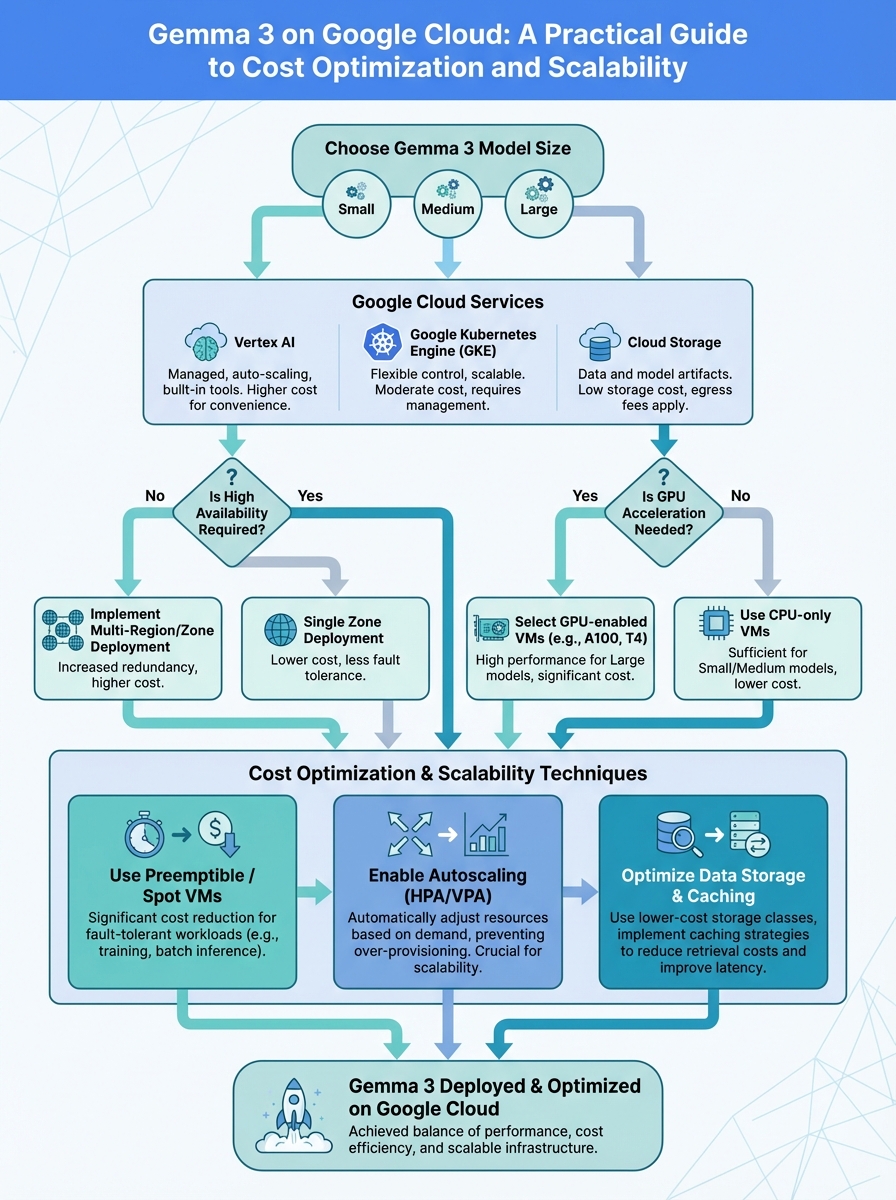
Once you have a clear understanding of your cost drivers, you can start implementing strategies to optimize your Gemma 3 Google Cloud deployment. Here are some proven techniques:
- Right-Sizing Compute Instances: Choose the smallest instance type that meets your performance requirements. Over-provisioning can lead to significant wasted resources. Consider using Google Cloud’s instance recommendations.
- Leveraging Preemptible VMs: For non-critical workloads, preemptible VMs offer substantial discounts (up to 80%) compared to on-demand instances. Be prepared for occasional interruptions.
- Using Committed Use Discounts (CUDs): If you have predictable compute needs, CUDs can provide significant savings (up to 57%) in exchange for a one- or three-year commitment.
- Optimizing Storage Costs: Use appropriate storage classes based on data access frequency. Infrequent data can be stored in cheaper storage classes like Nearline or Coldline.
- Implementing Data Compression: Compress your training data and model weights to reduce storage footprint and network transfer costs.
- Caching Frequently Accessed Data: Use caching mechanisms like Memorystore to reduce latency and the need to repeatedly fetch data from storage.
- Autoscaling: Automatically scale your compute resources based on demand to avoid over-provisioning during periods of low activity. Explore 7 Proven Strategies for H5 Mobile Debugging NIGHTMARES: A Practical Guide to Diagnosing and Fixing the Most Common Performance Bottlenecks (Even on Obscure Devices).
By implementing these Gemma 3 cost optimization strategies, you can significantly reduce your cloud expenses without compromising performance. Regularly review your resource utilization and adjust your configuration accordingly.
Scaling Gemma 3 on Google Cloud
Scalability is another critical aspect of deploying Gemma 3 Google Cloud. As your AI applications grow, you need to ensure that your infrastructure can handle the increasing demand without performance degradation. Google Cloud offers several tools and services to facilitate Gemma 3 scalability.
- Managed Instance Groups (MIGs): MIGs allow you to automatically manage and scale a group of identical VMs. You can configure autoscaling policies based on CPU utilization, memory usage, or custom metrics.
- Kubernetes Engine (GKE): GKE is a managed Kubernetes service that simplifies the deployment and management of containerized applications, including Gemma 3. It provides advanced features like auto-scaling, rolling updates, and self-healing.
- Cloud Functions: For event-driven workloads, Cloud Functions offer a serverless execution environment that automatically scales based on the number of incoming requests.
- Cloud Run: Cloud Run is another serverless platform that allows you to deploy containerized applications without managing any infrastructure. It automatically scales based on traffic.
When designing your Gemma 3 scalability strategy, consider factors such as latency requirements, throughput needs, and fault tolerance. Choose the appropriate scaling mechanism based on your specific application requirements.
Infrastructure Choices for Gemma 3 Google Cloud
The choice of infrastructure significantly impacts the performance and cost of your Gemma 3 Google Cloud deployment. Google Cloud offers a variety of compute options, each with its own strengths and weaknesses.
- CPUs: General-purpose CPUs are suitable for many AI workloads, especially during development and testing. Google Cloud offers a wide range of CPU instance types, from small to large.
- GPUs: GPUs are highly optimized for parallel processing and are ideal for training and inference of large language models like Gemma 3. Google Cloud offers various GPU options, including NVIDIA A100, T4, and V100.
- TPUs: Tensor Processing Units (TPUs) are custom-designed accelerators specifically for machine learning workloads. Google Cloud offers TPUs as a service, providing significant performance advantages for training and inference.
Consider your workload characteristics when choosing the appropriate infrastructure. For example, if you’re primarily focused on inference, GPUs or TPUs might be the best choice. If you’re running a mix of training and inference, a combination of CPUs and GPUs could be more cost-effective. You can also explore 7+ Proven Strategies for Tech Pitch for Non-Technical Founders Success in 2025: A Step-by-Step Guide.
Monitoring and Performance Tuning
Effective monitoring and performance tuning are essential for ensuring the optimal performance and cost-efficiency of your Gemma 3 Google Cloud deployment. Google Cloud provides several tools to help you monitor your resources and identify potential bottlenecks.
- Cloud Monitoring: Cloud Monitoring provides comprehensive visibility into your GCP resources, including CPU utilization, memory usage, network traffic, and disk I/O. You can create custom dashboards and alerts to track key performance indicators (KPIs).
- Cloud Logging: Cloud Logging collects and stores logs from your GCP resources, allowing you to troubleshoot issues and analyze application behavior.
- Cloud Profiler: Cloud Profiler helps you identify performance bottlenecks in your code by providing detailed insights into CPU and memory usage.
Regularly monitor your resources and analyze your logs to identify areas for improvement. Tune your model parameters, optimize your code, and adjust your infrastructure configuration to maximize performance and minimize costs. Continuous monitoring is key to successful Gemma 3 Google Cloud deployment.
Security Considerations for Gemma 3
Security is paramount when deploying Gemma 3 Google Cloud. Protecting your data and infrastructure from unauthorized access is crucial. Google Cloud offers a range of security features and services to help you secure your AI deployments.
- Identity and Access Management (IAM): IAM allows you to control access to your GCP resources by assigning roles and permissions to users and service accounts.
- Virtual Private Cloud (VPC): VPC allows you to create a private network within Google Cloud, isolating your resources from the public internet.
- Cloud Armor: Cloud Armor protects your applications from distributed denial-of-service (DDoS) attacks and other web-based threats.
- Cloud Key Management Service (KMS): KMS allows you to manage encryption keys for your data and applications.
Implement a robust security strategy that includes access control, network segmentation, data encryption, and regular security audits. Stay up-to-date with the latest security best practices and vulnerabilities. You might also find valuable information in 7+ Proven Strategies for Cybersecurity for SMBs Success in 2025: A Data-Driven Guide.
Best Practices for Gemma 3 Google Cloud Deployment
To ensure a successful Gemma 3 Google Cloud deployment, follow these best practices:
- Plan your deployment carefully: Define your requirements, budget, and performance goals before you start.
- Choose the right infrastructure: Select the appropriate compute, storage, and networking resources based on your workload characteristics.
- Optimize your costs: Implement cost optimization strategies such as right-sizing instances, leveraging preemptible VMs, and using committed use discounts.
- Scale your resources effectively: Use managed instance groups, Kubernetes Engine, or serverless platforms to automatically scale your resources based on demand.
- Monitor your performance: Use Cloud Monitoring, Cloud Logging, and Cloud Profiler to track key performance indicators and identify potential bottlenecks.
- Secure your environment: Implement a robust security strategy that includes access control, network segmentation, and data encryption.
- Automate your deployments: Use Infrastructure as Code (IaC) tools like Terraform to automate the creation and management of your GCP resources.
- Stay up-to-date: Keep abreast of the latest Google Cloud features, services, and best practices.
By following these best practices, you can maximize the benefits of Gemma 3 Google Cloud while minimizing costs and risks.
Case Studies: Gemma 3 Google Cloud Success
Let’s examine a few hypothetical case studies to illustrate how organizations have successfully deployed Gemma 3 Google Cloud.
Case Study 1: AI-Powered Customer Service
A large e-commerce company deployed Gemma 3 on Google Cloud to power its customer service chatbot. By using GPUs for inference and implementing autoscaling, the company was able to handle a large volume of customer inquiries with low latency and high accuracy. The company also leveraged committed use discounts to reduce its compute costs. They also explored AWS re:Invent 2025: A Builder’s Guide to Matt Garman’s Keynote for inspiration.
Case Study 2: Real-Time Language Translation
A global media organization used Gemma 3 Google Cloud to provide real-time language translation for its news broadcasts. By using TPUs for inference and optimizing its model for low latency, the organization was able to deliver accurate and timely translations to its audience. The organization also implemented data compression to reduce its storage costs.
These case studies demonstrate the versatility and power of Gemma 3 Google Cloud. By carefully planning their deployments and implementing best practices, organizations can achieve significant business benefits.
Future Trends in Gemma 3 and Google Cloud AI
The field of AI is constantly evolving, and Gemma 3 and Google Cloud are at the forefront of innovation. Here are some future trends to watch out for:
- More efficient models: Researchers are constantly developing new techniques to make large language models more efficient, reducing their computational requirements and costs.
- Serverless AI: Serverless platforms like Cloud Functions and Cloud Run will become increasingly popular for deploying AI applications, simplifying deployment and scaling.
- Edge AI: Deploying AI models on edge devices will enable new applications that require low latency and offline processing.
- Explainable AI (XAI): XAI techniques will become more important for understanding and trusting AI models, especially in critical applications.
Staying informed about these trends will help you prepare for the future of Gemma 3 Google Cloud and leverage the latest advancements in AI.
Frequently Asked Questions (FAQ)
- What are the key benefits of using Gemma 3 on Google Cloud?
Scalability, cost-effectiveness, access to cutting-edge infrastructure (GPUs, TPUs), and a comprehensive suite of AI development tools.
- How can I estimate the cost of running Gemma 3 on Google Cloud?
Use the Google Cloud Pricing Calculator to estimate compute, storage, and networking costs based on your specific requirements.
- What are the different instance types available for Gemma 3 on Google Cloud?
Google Cloud offers a variety of CPU, GPU, and TPU instance types suitable for different Gemma 3 workloads.
- How can I optimize the performance of Gemma 3 on Google Cloud?
Tune your model parameters, optimize your code, and use appropriate infrastructure (GPUs, TPUs) to maximize performance.
- What are the security considerations for deploying Gemma 3 on Google Cloud?
Implement a robust security strategy that includes access control, network segmentation, and data encryption to protect your data and infrastructure. Consider Cybersecurity Mesh Architecture: The Ultimate CSMA Guide for advanced security implementations.
- Where can I find more information about Gemma 3 and Google Cloud AI?
Refer to the official Google Cloud documentation, blog posts, and community forums for the latest information.
By understanding the concepts and implementing the strategies outlined in this guide, you can effectively deploy and manage Gemma 3 Google Cloud, maximizing its potential while optimizing costs and ensuring scalability.
| Feature | Gemma 3 on Google Cloud | Alternative Cloud Provider (Hypothetical) |
|---|---|---|
| Compute Options | Wide range of CPUs, GPUs, and TPUs | Limited GPU options, no TPUs |
| Scalability | Managed Instance Groups, Kubernetes Engine, Cloud Functions | Basic auto-scaling features |
| Cost Optimization | Preemptible VMs, Committed Use Discounts, Storage Classes | Limited cost optimization options |
| Monitoring | Cloud Monitoring, Cloud Logging, Cloud Profiler | Basic monitoring tools |
| Security | IAM, VPC, Cloud Armor, KMS | Basic security features |
Disclaimer: This guide is intended for informational purposes only and does not constitute professional advice. Google Cloud pricing and features are subject to change. Always refer to the official Google Cloud documentation for the most up-to-date information. Always prioritize your security when deploying applications on the cloud. For further reading on cloud security, see WIRED’s Cybersecurity section and for general cloud computing information, check out Forbes’ Cloud Computing section. For a broader understanding of machine learning concepts, visit the Wikipedia page on Machine Learning.