TL;DR
Git commit automation turns a commit message into an instruction layer for your engineering process. A developer writes one structured message, pushes code, and the system handles pull request creation, Jira validation, issue status updates, and team notifications automatically.
That means less browser hopping, fewer repetitive handoffs, and a cleaner delivery workflow. Instead of asking engineers to repeat the same information across GitHub, Jira, Slack, and internal documentation, the machine reads intent once and completes the rest.
For engineering leaders, that is not just a convenience upgrade. It is a process redesign.
The Real Bottleneck Is Not the Code
Most teams do not lose time because developers cannot solve technical problems. They lose time in the admin that wraps around delivery.
A bug gets fixed. Then someone opens GitHub, creates a pull request, copies a Jira key, updates ticket status, posts in Slack, and maybe adds a project log somewhere else. None of that work is hard. All of it interrupts flow.
That interruption is where git commit automation becomes valuable. It keeps the developer inside the terminal and moves the administrative workload into a deterministic workflow. Instead of treating a commit message as a passive description of work, the system treats it as an executable handoff.
A message like this:
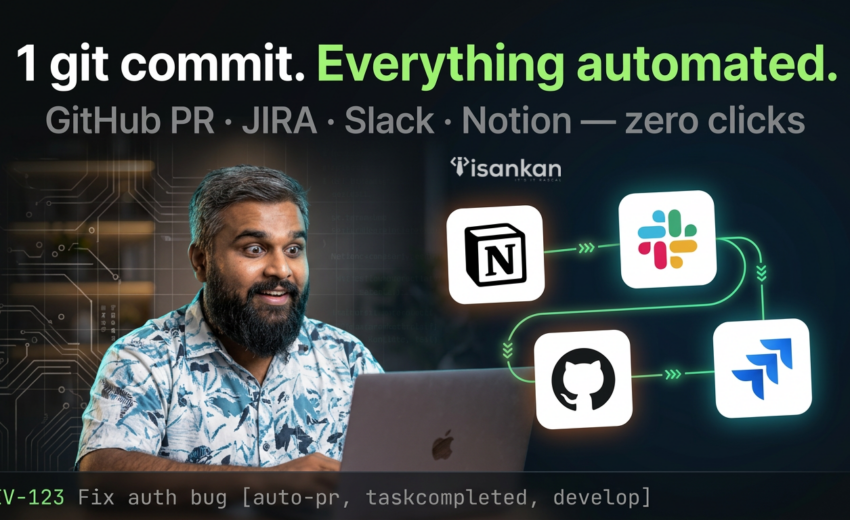
DEV-123 Fix auth bug [auto-pr, taskcompleted, develop]
does more than document the change. It tells the system what ticket is involved, what action should happen next, and where the pull request should go.
That shift matters because it removes repeated context switching. The commit becomes the single source of operational intent.

How Git Commit Automation Works
1. The decoder reads the commit message
The first stage is parsing.
The workflow reads the incoming commit message and extracts three things: the issue key, the human-readable change summary, and the command flags. In the example above, that means:
- Jira key:
DEV-123 - change summary:
Fix auth bug - commands:
auto-pr,taskcompleted,develop
This is where reliability starts. Good automation does not guess. It enforces a pattern.
If the commit format is invalid, the workflow should stop immediately and return a visible error. That is the difference between trusted automation and the kind that quietly creates messes.
2. A duplicate PR guard checks for existing work
Before creating anything, the system should check whether a pull request already exists for the branch.
This matters because developers often push several times from the same branch. Without a guard, every qualifying push risks creating another pull request and spamming the repository.
GitHub supports webhook-driven event delivery to external systems, and GitHub’s REST API supports pull request operations including creation and retrieval. That makes it practical to inspect repository state before taking action.
The clean pattern is simple:
- if a PR already exists, skip creation
- if no PR exists, continue
- optionally update or comment on the existing PR instead of creating a duplicate
That single check keeps automated workflows from becoming repository clutter.
3. The system creates the pull request automatically
Once validation passes, the workflow can create the PR through the GitHub REST API.
The PR can be assembled from the commit data:
- Title:
DEV-123 Fix auth bug - Head branch: current feature branch
- Base branch:
develop - Body: generated summary with linked Jira context
GitHub documents that pull requests can be listed, viewed, edited, created, and merged through the REST API. In practice, that means your workflow can move from commit parsing to PR creation without anyone opening GitHub’s UI.
That is the point where the experience changes for developers. The browser step disappears from the default path.
4. Jira validation prevents ghost updates
This is the stage most teams get wrong.
It is easy to automate a status change. It is harder to automate it safely.
A good workflow should validate the Jira issue before moving anything. That means confirming the issue exists, confirming the key is correct, and only then applying a transition when the relevant command flag is present.
Jira Cloud exposes REST APIs for issue access and workflow-related operations, which is what makes this validation-and-transition pattern possible.
In a safe workflow:
- the issue key is checked first
- the transition rule is explicit
- the system stops on failure
- no status movement happens on an invalid issue
That protects the integrity of the delivery pipeline. You do not want automation that updates the wrong work item faster.
5. Team visibility happens automatically
Once the PR is created and the ticket is updated, the workflow can broadcast the result.
Slack supports publishing messages through chat.postMessage, and Notion’s API supports creating pages or structured entries programmatically. That means the same event that creates the pull request can also notify the team and write a durable record elsewhere.
This is where the workflow starts helping more than just the developer. Product managers, engineering leads, and cross-functional teammates get visibility without asking for it.
Nobody needs to wonder whether the code moved. The system already logged the handoff.
Why This Is a System Shift, Not a Tool Trick
A lot of process improvements fail because they stay at the level of personal productivity.
This is different.
Git commit automation changes the operating model of the team. It moves routine delivery admin from individual behavior to system behavior. That means the process becomes more consistent because compliance is embedded in the workflow rather than requested from the developer after the fact.
That matters for engineering leadership.
If your sprint process still depends on people remembering to open three tools and repeat the same information manually, you do not have a motivation problem. You have a systems design problem.
The best engineering organizations do not just encourage good process. They remove avoidable manual work from the process wherever possible.
What Makes This Workflow Reliable
Strict input beats smart guessing
The strongest automation systems are narrow where they need to be narrow.
That means commit syntax should be strict, documented, and intentionally limited. A ticket key, a plain-language summary, and a command block are usually enough.
When automation accepts vague input, it starts guessing. Once it guesses, it eventually fails in confusing ways.
Fast failure builds trust
If the format is wrong, the workflow should stop loudly.
If the issue does not exist, it should stop loudly.
If the PR already exists, it should skip creation cleanly.
Engineers trust automation when the workflow behaves predictably and makes errors visible. Silent failure is what kills adoption.
Explicit commands reduce ambiguity
A flag like taskcompleted is better than inference.
The system does not need to guess whether this push should advance work. It reads the instruction and executes the known rule. That also makes the automation easier to extend later with commands like readyforqa, hotfix, or skipnotify.
Central orchestration keeps the logic maintainable
This kind of workflow works best when one system coordinates the steps across GitHub, Jira, Slack, and Notion.
n8n is useful here because it can orchestrate webhook triggers and API calls in one place, and it offers self-hosting for teams that want infrastructure control. n8n also makes clear that self-hosting requires real operational knowledge around servers, scaling, security, and configuration.
That trade-off is important. Flexibility is valuable. Ownership still comes with operational cost.
Trade-offs You Should Consider
No automation system is free of trade-offs.
The first is onboarding. Developers need to learn the commit grammar. That cost is usually small, but it exists.
The second is governance. You need clear rules around which branches can be targeted, which statuses can be moved, and which commands are supported. Bad process becomes bad automation very quickly.
The third is edge cases. Not every push should create a PR. Not every valid ticket should transition. Mature workflows need safe exceptions, not one giant rule pretending to cover every case.
The fourth is infrastructure ownership. Self-hosted orchestration gives you control, but it also means updates, secrets, monitoring, and failure recovery become your responsibility. n8n explicitly warns that self-hosting is for teams with the technical capacity to run it safely.
The fifth is over-automation. Pull request creation and status updates are perfect automation candidates. Design review, security judgment, and release decisions still belong to humans.
Good engineering automation removes repetitive admin. It does not remove meaningful oversight.
How to Implement Git Commit Automation in a Real Team
Start small.
Build the first version around one repository, one branch rule, and one status transition. Do not try to automate every delivery scenario on day one.
A practical rollout looks like this:
Step 1: Define the commit contract
Create one approved format and document it in the repository.
Example:
DEV-123 Fix auth bug [auto-pr, taskcompleted, develop]
Step 2: Parse and validate
The workflow should reject malformed commits before it attempts any downstream action.
Step 3: Connect GitHub events to your orchestrator
GitHub webhooks are designed to notify external systems when repository events occur, which makes them a natural trigger for this workflow.
Step 4: Add PR duplication checks
Before creating a pull request, query GitHub for an existing PR from the same head branch to the same base branch. GitHub’s REST API supports that style of pull request interaction.
Step 5: Validate Jira before transition
Only move the issue when the key exists and the command flag is present.
Step 6: Broadcast outcomes
Publish success or failure to Slack and log the result to Notion when appropriate. Slack and Notion both provide API paths for those actions.
Step 7: Scale after the workflow is stable
Once it works cleanly in one repository, generalize it into a reusable pattern.
That is where the real leverage appears.
Frequently Asked Questions
What is git commit automation?
Git commit automation is a workflow pattern where a structured commit message triggers actions such as pull request creation, ticket validation, issue transitions, and notifications. It turns the commit into an instruction source rather than just a historical note.
Can GitHub create pull requests automatically?
Yes. GitHub provides webhook delivery for repository events and REST API support for pull request creation and management. That combination is what makes auto PR workflows possible.
Can Jira status updates be automated safely?
Yes, but only when the workflow validates the issue first and uses explicit transition rules. Safe automation depends on guardrails, not just API access. Jira Cloud provides issue and workflow-related REST API capabilities that enable this pattern.
Why use n8n for engineering workflow automation?
n8n is useful because it can orchestrate webhooks and multi-step API workflows in one place, and it supports self-hosting for teams that want more control. That said, n8n also notes that self-hosting requires technical expertise and operational care.
Does this replace code review?
No. It replaces repetitive handoff work around delivery. Review quality, architectural judgment, and approval still need people.