
The modern digital landscape demands more than just system uptime; it requires trust and transparency. Your status page is the first line of defense in maintaining that trust during inevitable service disruptions.
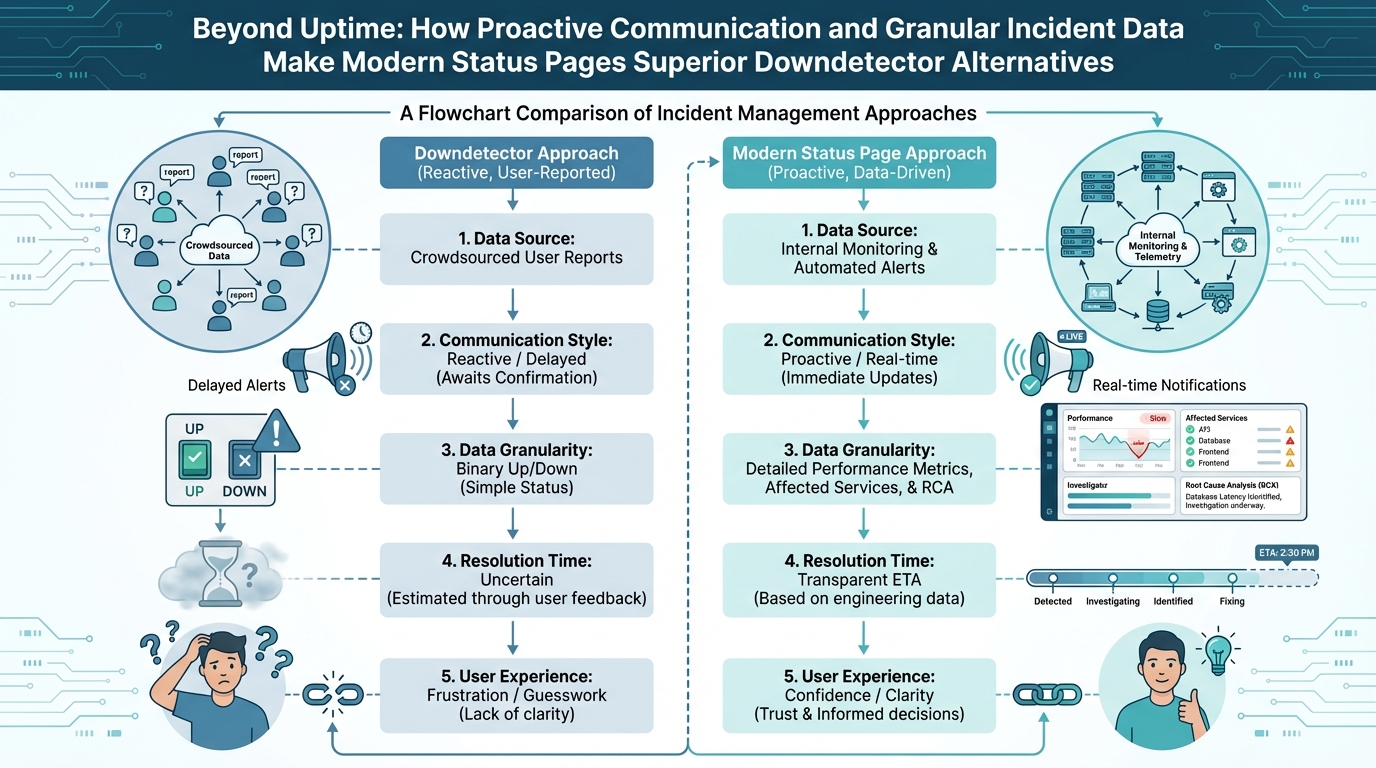
Downdetector serves a purpose, sure. It crowdsources outage reports, but it’s reactive, and frankly, it often spreads panic more than clarity. We need something better: a proactive, informative, and data-rich status page.
I’ve been building and managing systems for over 15 years, and I’ve seen firsthand the damage that poor incident communication can inflict. A well-crafted status page isn’t just about saying “we’re down”; it’s about building confidence in your ability to resolve issues quickly and effectively.
Table of Contents
- Introduction: Beyond Uptime
- The Problems with Relying on Downdetector
- The Benefits of a Superior status page
- Proactive Communication: Setting the Standard
- Granular Incident Data: The Key to Trust
- Essential Features of a Modern status page
- Implementation Strategies for a Successful status page
- Best Practices for Maintaining Your status page
- Tools and Platforms for Building a Great status page
- The Future of status page
- Conclusion: Elevating Incident Communication
- FAQ
Featured Snippet: A status page is a publicly accessible web page that provides real-time information about the health and operational status of a system or service. It’s a critical tool for transparent incident communication, offering updates on outages, maintenance, and overall system performance, fostering trust and reducing support inquiries.
Introduction: Beyond Uptime
Uptime is a vanity metric. Sure, 99.999% uptime sounds great, but it doesn’t tell the whole story. What happens during those brief periods of downtime? How do you communicate with your users? How do you maintain their trust?
That’s where a modern status page comes in. It’s more than just a glorified “is it up?” indicator. It’s a communication hub, a source of truth, and a tool for building stronger relationships with your users. We need to move past reactive responses and embrace proactive communication. This includes things like planned maintenance announcements. I once worked on a project where planned maintenance wasn’t properly communicated, leading to a flood of support tickets and frustrated users. A simple status page update could have prevented the entire debacle.
The Problems with Relying on Downdetector
Downdetector, while popular, has significant limitations. It relies on user-submitted reports, which can be inaccurate, delayed, and skewed by localized issues. It’s like relying on rumors instead of facts.
Here’s why Downdetector falls short as a status page alternative:
- Reactive Nature: Downdetector only reflects problems *after* users experience them. You’re always playing catch-up.
- Inaccurate Data: User reports are subjective and can be influenced by factors unrelated to actual outages.
- Lack of Context: Downdetector provides no insight into the *cause* of the issue or the steps being taken to resolve it.
- Potential for False Alarms: A spike in reports doesn’t always indicate a widespread outage. It could be a localized problem or even a coordinated attack.
I remember one instance where a minor network hiccup triggered a massive wave of Downdetector reports. Users were panicking, assuming a major outage, when in reality, it was resolved within minutes. A proper status page, with real-time monitoring data, would have painted a much more accurate picture.
The Benefits of a Superior status page
A well-designed status page offers numerous advantages over relying on Downdetector or other reactive methods:
- Proactive Communication: Inform users *before* they experience problems, reducing frustration and support inquiries.
- Accurate Information: Provide real-time data on system health and incident status, eliminating guesswork and rumors.
- Increased Transparency: Demonstrate your commitment to resolving issues quickly and effectively, building trust and loyalty.
- Reduced Support Load: Answer common questions about outages and maintenance, freeing up your support team to focus on more complex issues.
- Improved Brand Reputation: Show that you’re in control of your systems and that you value your users’ experience.
Think of your status page as an investment in customer satisfaction. It’s a way to show your users that you care about their experience and that you’re committed to providing reliable service. A proactive approach can make all the difference. Check out 9 Essential Strategies for Building a Profitable Lo-Fi Channel in 2024: A Data-Driven AI Audio Tool Comparison for another perspective on building trust through transparency in a different domain.
Proactive Communication: Setting the Standard
Proactive communication is the cornerstone of a superior status page. It’s about anticipating potential problems and informing users *before* they’re affected. This requires a shift in mindset from reactive to proactive. It’s not enough to just respond to outages; you need to actively monitor your systems and communicate potential issues in advance.
Here are some key elements of proactive communication:
- Planned Maintenance Announcements: Inform users about upcoming maintenance windows, including the expected duration and potential impact.
- Early Warning Systems: Implement monitoring tools that can detect potential problems before they escalate into full-blown outages.
- Regular Updates: Provide frequent updates on the status of ongoing incidents, even if there’s no new information to report. Silence breeds uncertainty and frustration.
- Clear and Concise Language: Avoid technical jargon and explain issues in a way that everyone can understand.
- Multiple Communication Channels: Use a variety of channels to reach your users, including your status page, email, social media, and in-app notifications.
We recently implemented a new monitoring system that allowed us to detect potential database issues before they impacted users. We proactively notified users of a possible slowdown, giving them time to adjust their workflows. The result? A significant reduction in support tickets and a noticeable increase in user satisfaction.
Granular Incident Data: The Key to Trust
A modern status page isn’t just about reporting outages; it’s about providing granular data on the *cause* of the issue, the *impact* on users, and the *steps* being taken to resolve it. This level of transparency builds trust and demonstrates your commitment to resolving issues quickly and effectively. Granular data helps users understand the scope and severity of the incident.
Here’s what granular incident data looks like in practice:
- Root Cause Analysis: Explain the underlying cause of the outage, not just the symptoms.
- Impact Assessment: Identify which users or services are affected and to what extent.
- Resolution Timeline: Provide a clear timeline of the steps being taken to resolve the issue, including estimated time to resolution (ETR).
- Workarounds: Suggest temporary workarounds that users can use to mitigate the impact of the outage.
- Post-Mortem Analysis: Share a detailed analysis of the incident after it’s resolved, including lessons learned and steps taken to prevent recurrence.
I’ve seen status page updates that simply said “outage reported.” That’s not helpful. Users want to know *why* the outage occurred and what you’re doing about it. Providing granular data shows that you’re taking the issue seriously and that you’re committed to finding a solution. Also, if you are using Microsoft Teams, you can check 11 Expert Strategies for n8n Microsoft Teams OAuth2 Integration Success in 2025 to improve your team communications.
Essential Features of a Modern status page
A modern status page is more than just a static webpage. It’s a dynamic, interactive tool that provides real-time information and facilitates communication. Here are some essential features:
- Real-Time Monitoring: Display real-time data on system health and performance, using graphs and charts to visualize trends.
- Automated Incident Detection: Integrate with monitoring tools to automatically detect and report incidents.
- Customizable Notifications: Allow users to subscribe to notifications via email, SMS, or other channels.
- Multi-Language Support: Offer your status page in multiple languages to cater to a global audience.
- Historical Incident Data: Provide access to historical incident data, allowing users to track your system’s reliability over time.
- API Integration: Offer an API that allows users to integrate your status page with their own systems and workflows.
- Branding: Customize your status page to match your brand identity.
- Mobile Responsiveness: Ensure that your status page is accessible on all devices, including smartphones and tablets.
Don’t underestimate the power of visual data. A well-designed graph can convey more information than a wall of text. Also, think about accessibility. Is your status page usable by people with disabilities? Are you following accessibility guidelines? These are important considerations.
Implementation Strategies for a Successful status page
Implementing a successful status page requires careful planning and execution. Here are some strategies to consider:
- Define Your Goals: What do you want to achieve with your status page? Reduce support inquiries? Improve user trust? Increase transparency?
- Choose the Right Platform: Select a status page platform that meets your needs and budget. (More on this later.)
- Integrate with Your Monitoring Tools: Ensure that your status page is integrated with your monitoring tools to automatically detect and report incidents.
- Develop a Communication Plan: Define clear roles and responsibilities for incident communication. Who is responsible for updating the status page? Who is responsible for responding to user inquiries?
- Train Your Team: Train your team on how to use the status page and how to communicate effectively during incidents.
- Promote Your status page: Make sure your users know where to find your status page. Include a link in your website footer, your app, and your email signatures.
- Test Your status page: Regularly test your status page to ensure that it’s working properly. Simulate outages and practice your communication plan.
One of the biggest mistakes I see is companies launching a status page and then forgetting about it. It’s not a one-time project; it’s an ongoing process. You need to continuously monitor your systems, update your status page, and refine your communication plan.
Best Practices for Maintaining Your status page
Maintaining a successful status page requires ongoing effort and attention. Here are some best practices to follow:
- Keep It Up-to-Date: Regularly update your status page with the latest information on system health and incident status. Even if there’s no new information to report, acknowledge that you’re still working on the issue.
- Be Transparent: Be honest and transparent about the cause of outages and the steps being taken to resolve them. Don’t try to sugarcoat the situation.
- Use Clear and Concise Language: Avoid technical jargon and explain issues in a way that everyone can understand.
- Respond to User Inquiries: Monitor your status page for user inquiries and respond promptly.
- Analyze Your Data: Track key metrics, such as page views, subscription rates, and user feedback, to identify areas for improvement.
- Solicit Feedback: Ask your users for feedback on your status page and use their suggestions to make it even better.
- Practice Incident Response: Conduct regular incident response drills to ensure that your team is prepared to handle outages effectively.
Remember, your status page is a reflection of your company’s values. It’s a way to show your users that you care about their experience and that you’re committed to providing reliable service. If you’re dealing with media files, also consider 7+ Expert Strategies for Mastering Netflix AV1 Codec for Low-Bandwidth Streaming in 2025 to provide information about your content delivery systems.
Tools and Platforms for Building a Great status page
There are many tools and platforms available for building a status page. Here are a few popular options:
- Atlassian Statuspage: A popular platform with a wide range of features and integrations.
- Cachet: An open-source status page system that you can host yourself.
- Instatus: A simple and affordable status page platform.
- Better Uptime: Combines monitoring, incident management, and status page functionality.
- UptimeRobot: Primarily a website monitoring tool, but also offers a basic status page feature.
The best platform for you will depend on your specific needs and budget. Consider factors such as features, integrations, pricing, and ease of use. I’ve personally used Atlassian Statuspage and found it to be a solid choice, but it can be pricey for smaller organizations. Cachet is a great option if you’re comfortable with self-hosting. Also remember the importance of managing data updates, you can learn more from Mastering Real-Time Data Updates with WebSocket APIs.
Here’s a comparison table to help you make a decision:
| Platform | Pros | Cons | Pricing |
|---|---|---|---|
| Atlassian Statuspage | Feature-rich, integrates with other Atlassian products | Can be expensive | Starts at $29/month |
| Cachet | Open-source, self-hosted, customizable | Requires technical expertise to set up and maintain | Free |
| Instatus | Simple, affordable, easy to use | Fewer features than some other platforms | Starts at $20/month |
| Better Uptime | Combines monitoring, incident management, and status page | Can be overwhelming for simple use cases | Starts at $30/month |
| UptimeRobot | Affordable website monitoring with basic status page | Limited status page functionality | Starts at $0/month |
The Future of status page
The status page is evolving beyond a simple incident reporting tool. In the future, we can expect to see more:
- AI-Powered Insights: AI can be used to analyze monitoring data and predict potential outages before they occur.
- Personalized Experiences: status page can be personalized to show users only the information that’s relevant to them.
- Interactive Communication: status page will allow users to interact with support teams in real-time.
- Predictive Analytics: Using historical data to predict future incidents and proactively address potential issues.
The status page of the future will be a proactive, personalized, and interactive communication hub that helps companies build stronger relationships with their users. Also, if you are concerned about other areas, you can check 7+ Expert Strategies for Understanding the Shingles Dementia Connection in 2025.
Conclusion: Elevating Incident Communication
A modern status page is a critical tool for transparent incident communication. By moving beyond reactive responses and embracing proactive communication and granular incident data, you can build trust with your users, reduce support inquiries, and improve your brand reputation. Ditch Downdetector and invest in a status page that truly reflects your commitment to providing reliable service.
It’s not just about saying “we’re down.” It’s about demonstrating that you’re in control, that you care about your users, and that you’re committed to resolving issues quickly and effectively. That’s the power of a superior status page.
FAQ
- What is the difference between a status page and Downdetector?
- A status page is a proactive communication tool managed by the service provider, offering real-time, accurate information about system health. Downdetector is a reactive platform relying on user-submitted reports, which can be delayed, inaccurate, and lack context.
- How often should I update my status page during an incident?
- Update your status page frequently, even if there’s no new information. Acknowledge that you’re still working on the issue and provide estimated time to resolution (ETR) whenever possible. Aim for updates at least every 30-60 minutes during critical incidents.
- What information should I include in my status page?
- Include real-time system health data, incident status updates, root cause analysis, impact assessment, resolution timeline, workarounds (if available), and post-mortem analysis after the incident is resolved.
- How can I promote my status page to my users?
- Include a link to your status page in your website footer, your app, your email signatures, and your social media profiles. Announce planned maintenance windows on your status page in advance.
- Is a free status page platform sufficient for my needs?
- It depends on your needs. Free platforms may lack features such as integrations, customization, and advanced monitoring. Consider your budget and the importance of these features when making your decision.
- Can a status page really reduce support inquiries?
- Yes! By providing proactive updates and answering common questions about outages and maintenance, a well-maintained status page can significantly reduce the number of support tickets you receive.