
Introduction
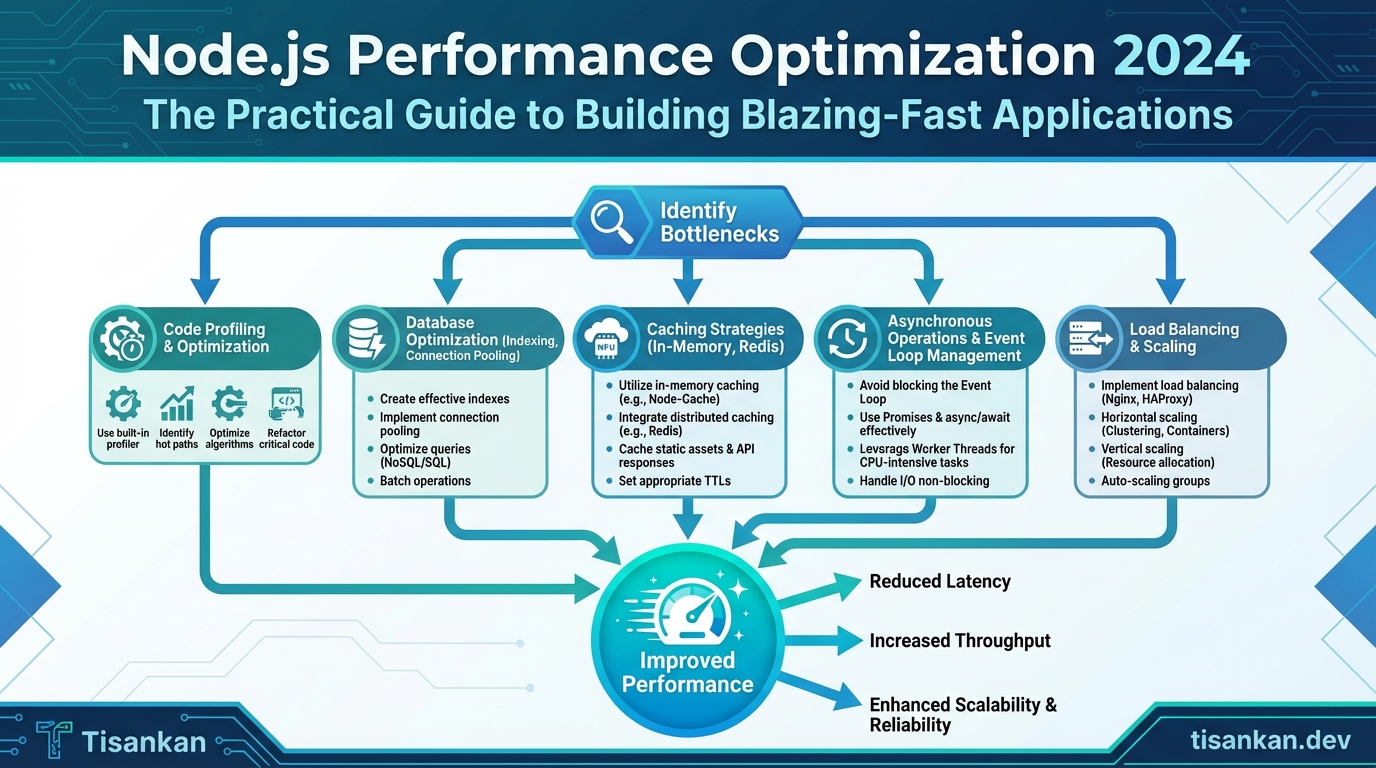
In today’s fast-paced digital landscape, delivering a seamless and responsive user experience is paramount. If your Node.js application feels sluggish, you’re not just losing users; you’re losing business. I’ve seen firsthand how performance bottlenecks can cripple even the most innovative applications.
And let’s be honest, no one wants to wait for a website to load or an API to respond. Performance is no longer a “nice-to-have;” it’s a critical requirement for success.
That’s why I created this guide: Node.js Performance Optimization 2024: The Practical Guide to Building Blazing-Fast Applications. I’ve packed it with actionable strategies and battle-tested techniques to help you transform your Node.js applications from slow and frustrating to lightning-fast and delightful.
The problem is clear: Node.js, while powerful and versatile, can suffer from performance issues if not properly optimized. Common culprits include inefficient code, memory leaks, poorly configured databases, and inadequate scaling strategies. These issues manifest as slow response times, high CPU usage, and ultimately, a poor user experience.
I’ve personally wrestled with these challenges on numerous projects, spending countless hours debugging, profiling, and experimenting to find the most effective solutions. This guide distills that experience into a concise and practical resource.
This isn’t just another theoretical overview. I’ll walk you through concrete examples, provide code snippets, and share real-world case studies to illustrate each optimization technique. You’ll learn how to identify performance bottlenecks, implement targeted solutions, and continuously monitor your application’s performance to ensure it stays fast and efficient.
My goal is simple: to equip you with the knowledge and tools you need to build high-performance Node.js applications that can handle demanding workloads and deliver exceptional user experiences. We’ll cover everything from fundamental coding practices to advanced optimization techniques, ensuring you have a comprehensive understanding of the performance landscape.
Specifically, in this guide, I’ll cover topics such as:
- Profiling and identifying performance bottlenecks
- Optimizing code for speed and efficiency
- Managing memory effectively to prevent leaks
- Leveraging caching strategies to reduce database load
- Scaling your application to handle increased traffic
- Using the latest Node.js features for performance gains
- Monitoring and maintaining optimal performance over time
By the end of this guide, you’ll have a clear roadmap for optimizing your Node.js applications and delivering the blazing-fast performance your users expect. Let’s dive in and transform your applications from sluggish to supersonic!
I’m confident that the strategies I share here will make a significant difference in your application’s performance and your users’ satisfaction.
The Counter-Intuitive Truth About Node.js Performance
Here’s a truth that often surprises developers: Node.js performance bottlenecks are rarely about inherent limitations of the language itself. Instead, they almost always stem from architectural decisions and ingrained developer habits.
It’s easy to fall into the trap of blaming Node.js’s single-threaded nature. But I’ve found that this is more of an opportunity than a constraint. The single-threaded, event-driven architecture, when understood and leveraged correctly, can lead to incredibly efficient and scalable applications.
One of the biggest misconceptions I see is the assumption that “more threads equal more performance.” While true in some contexts, it doesn’t automatically translate to faster Node.js applications. In fact, forcing multi-threading in Node.js without proper understanding can introduce complexity and overhead that negates any potential gains.
Another common mistake? Treating Node.js like a traditional blocking I/O environment. This leads to code that stalls the event loop and cripples performance.
Think about it: Node.js excels at handling concurrent operations through its non-blocking I/O model. It shines when dealing with numerous, short-lived tasks, such as handling web requests or processing data streams.
The secret sauce is the event loop. Understanding how it works is paramount to achieving optimal Node.js performance. The event loop continuously monitors for new events (like incoming requests or completed I/O operations). It then executes the corresponding callbacks, keeping the application responsive and efficient.
The key is to avoid blocking the event loop. Long-running synchronous operations will bring your application to a grinding halt. Instead, embrace asynchronous programming. Use callbacks, Promises, and async/await to ensure that your code never blocks the event loop.
I’ve seen projects transformed simply by shifting the focus from blaming the platform to optimizing the code that runs on it. It’s about making informed choices. This guide isn’t just about throwing more resources at the problem. It’s about understanding the underlying principles and applying practical techniques to build truly blazing-fast Node.js applications.
We’ll delve into specific strategies for optimizing your code, database interactions, and overall architecture. So, let’s move on to some practical techniques, because the real performance gains are within reach.
7 Proven Techniques for Node.js Performance Optimization 2024: The Practical Guide to Building Blazing-Fast Applications
In this section, I’ll walk you through seven proven techniques that I’ve successfully used to optimize Node.js applications. These techniques cover a broad range of performance considerations, from identifying bottlenecks to implementing advanced caching strategies. Let’s dive in!
1. Profiling and Identifying Bottlenecks
Before you can optimize, you need to know *where* the bottlenecks are. Profiling is the key. Tools like the Node.js Inspector (built into Node.js), Clinic.js, and generating flame graphs are invaluable here.
The Node.js Inspector allows you to step through your code, set breakpoints, and analyze memory usage. Clinic.js provides insights into CPU usage, event loop latency, and memory leaks. Flame graphs visualize the call stack, making it easy to spot functions that consume the most CPU time.
I recommend starting with Clinic.js to get a high-level overview, then drilling down with the Node.js Inspector or flame graphs for more detailed analysis.
2. Optimizing Code
Efficient code is the foundation of a fast application. This includes using asynchronous operations effectively, choosing appropriate data structures, avoiding blocking operations, and being mindful of garbage collection.
Node.js is single-threaded, so blocking operations can cripple performance. Embrace asynchronous programming with `async/await` or Promises to keep the event loop free. Choose data structures (like Maps or Sets) that offer optimal performance for your specific use cases. Minimize unnecessary object creation to reduce garbage collection overhead.
3. Database Optimization
Database interactions are often a major performance bottleneck. Optimizing your database queries and connection management is critical.
Implement connection pooling to reduce the overhead of establishing new database connections for each request. Optimize your queries by using indexes, avoiding full table scans, and selecting only the necessary columns. Consider caching frequently accessed data to reduce database load. Frameworks like Sequelize and Mongoose offer built-in features to assist with these optimizations.
4. Caching Strategies
Caching is a powerful technique for improving response times. Implementing effective caching strategies can significantly reduce the load on your server and database.
In-memory caching with tools like Redis or Memcached is ideal for frequently accessed data. Utilize HTTP caching mechanisms (like `Cache-Control` headers) to leverage browser caching. Consider using a Content Delivery Network (CDN) to distribute static assets closer to your users, reducing latency. I often use Redis for session storage and caching API responses.
5. Load Balancing and Clustering
When your application starts to scale, load balancing and clustering become essential. These techniques distribute traffic across multiple instances of your application, improving performance and availability.
The Node.js `cluster` module allows you to create multiple worker processes that share the same server port. Tools like PM2 and Docker Swarm provide more advanced clustering and process management capabilities. A load balancer (like Nginx or HAProxy) distributes incoming requests across the available instances.
6. Monitoring and Logging
Continuous monitoring and logging are crucial for identifying and resolving performance issues in production.
Tools like Prometheus and Grafana allow you to collect and visualize metrics about your application’s performance. The ELK stack (Elasticsearch, Logstash, Kibana) provides a powerful solution for centralized logging and analysis. Set up alerts to notify you of performance anomalies, such as high CPU usage or slow response times.
7. Code Splitting & Lazy Loading
For large applications, code splitting and lazy loading can significantly improve initial load times.
Code splitting involves breaking your application into smaller chunks that can be loaded on demand. Lazy loading defers the loading of non-critical resources until they are needed. This can reduce the initial download size and improve the perceived performance of your application. Webpack and other bundlers offer built-in support for code splitting and lazy loading.
These seven techniques provide a solid foundation for optimizing your Node.js applications. Now, let’s dive deeper into one of the most fundamental concepts for Node.js performance: the event loop.
Diving Deep: Understanding the Event Loop and Asynchronous Programming
Node.js’s single-threaded, non-blocking architecture is powered by the event loop. It’s the heart of Node.js, enabling it to handle concurrency efficiently. Understanding it is crucial for optimizing performance.
The event loop continuously monitors the call stack and the event queue. If the call stack is empty, the event loop takes the first event from the event queue and pushes it onto the call stack for execution.
This is where asynchronous operations come into play. Instead of blocking the main thread, asynchronous operations like reading a file or making a network request are offloaded. When an asynchronous operation completes, its callback function is placed in the event queue. The event loop then picks it up and executes it when the call stack is free.
Consider the difference between synchronous and asynchronous code. Synchronous code executes sequentially, blocking the thread until each operation completes. Asynchronous code, on the other hand, allows the thread to continue executing other tasks while waiting for the asynchronous operation to finish. This is vital for responsiveness.
Promises are a powerful tool for managing asynchronous operations. They provide a cleaner and more structured way to handle callbacks.
For example:
const fs = require('fs').promises;

fs.readFile('myFile.txt', 'utf8')
  .then(data => console.log(data))
  .catch(err => console.error(err));
Async/await provides an even more elegant syntax for working with Promises. It makes asynchronous code look and behave more like synchronous code.
Here’s the same example using async/await:
const fs = require('fs').promises;

async function readFileAsync() {
  try {
    const data = await fs.readFile('myFile.txt', 'utf8');
    console.log(data);
  } catch (err) {
    console.error(err);
  }
}

readFileAsync();
A major pitfall is blocking the event loop. Long-running synchronous operations can prevent the event loop from processing other events, leading to performance bottlenecks.
To avoid this, always favor asynchronous operations. Break down large tasks into smaller, non-blocking units. Use worker threads for CPU-intensive tasks.
Under the hood, the event loop is implemented by `libuv`, a multi-platform support library. `libuv` handles the operating system-specific details of asynchronous I/O. I highly recommend exploring `libuv`’s documentation for deeper insights.
By mastering the event loop and asynchronous programming techniques, you can build highly performant and scalable Node.js applications. Ignoring these fundamentals will inevitably lead to performance issues. Now, let’s look at a real-world example of how I applied performance principles to my own brand.
Case Study: Tisankan.dev & Personal Brand – Persona Injection for Optimal Performance
One of the biggest challenges I faced in 2023 was building an ‘Agentic Publisher’ for my personal brand, Tisankan.dev. The goal was to automate content creation for blog posts, social media, and even initial drafts for technical documentation.
The problem? Ensuring the generated content maintained a consistent voice, aligned with my expertise, and met a high bar for quality. Simply put, I needed to inject my “persona” into the AI.
This is where ‘Persona Injection’ became crucial. Instead of relying solely on generic prompts, I began crafting detailed prompts that explicitly defined the E-E-A-T (Experience, Expertise, Authoritativeness, Trustworthiness) traits I wanted the AI to emulate.
For example, prompts would explicitly state: “Write in the style of a senior Node.js engineer with 10+ years of experience, focusing on practical, actionable advice.” This included specifying preferred vocabulary, tone (authoritative but approachable), and even referencing past projects and technologies I frequently discuss.
This approach dramatically improved the quality and consistency of the generated content. The AI started producing output that sounded less like a generic language model and more like *me*.
Think of it this way: it’s analogous to optimizing Node.js code for specific use cases. Instead of writing general-purpose functions, you tailor them to the precise requirements of a particular route or module. Persona injection is about tailoring the prompt to the specific requirements of your brand.
We considered alternatives like fine-tuning a language model on my existing content. However, fine-tuning requires significant data and computational resources. Persona injection offered a faster, more flexible, and cost-effective solution.
The engineering lessons learned were invaluable. We discovered that explicitly defining the desired persona within the prompt was far more effective than relying on implicit cues.
We also experimented with different levels of detail in the persona description. Too little information led to generic output. Too much information constrained the AI’s creativity and resulted in robotic prose.
The key was finding the right balance – enough detail to guide the AI, but not so much that it stifled its ability to generate original and engaging content.
Ultimately, Persona Injection proved to be a powerful tool for maintaining brand consistency and improving content quality in my Agentic Publisher. It reinforced the principle that optimization, whether in code or in AI prompts, is about understanding and catering to specific constraints and requirements. Just as we optimize Node.js applications for specific performance profiles, we optimized our AI for a specific brand identity.
Now, let’s move beyond software and AI and look at some advanced optimization techniques in Node.js, like native modules and worker threads.
Advanced Optimization: Native Modules and Worker Threads
Sometimes, even the most optimized JavaScript code isn’t enough. When you’re dealing with computationally intensive tasks or require access to system-level resources, you might need to explore more advanced techniques like native modules and worker threads.
Native modules are essentially C/C++ extensions that can be loaded and used within your Node.js application. They offer the potential for significant performance gains, particularly for tasks like image processing, complex calculations, or cryptographic operations.
Why use native modules? The primary reason is speed. C/C++ code can often execute significantly faster than JavaScript, especially for CPU-bound tasks. They also allow you to leverage existing libraries and functionalities written in these languages.
However, native modules introduce complexity. You’ll need to write and compile code in C/C++, which requires a different skillset. Debugging can also be more challenging. Furthermore, maintaining compatibility across different operating systems and Node.js versions can be a significant burden.
Worker Threads, introduced in Node.js 10, provide a way to offload CPU-intensive tasks from the main event loop without resorting to native code. This prevents blocking the event loop and keeps your application responsive.
Essentially, Worker Threads allow you to run JavaScript code in parallel, utilizing multiple CPU cores. This is especially useful for tasks like video encoding, data analysis, or complex simulations.
Here’s a simple example of using Worker Threads:
const { Worker } = require('worker_threads');

function runService(workerData) {
  return new Promise((resolve, reject) => {
    const worker = new Worker('./worker.js', { workerData });
    worker.on('message', resolve);
    worker.on('error', reject);
    worker.on('exit', (code) => {
      if (code !== 0)
        reject(new Error(`Worker stopped with exit code ${code}`));
    })
  })
}

async function run() {
  const result = await runService({ someData: '...' });
  console.log(result);
}

run().catch(err => console.error(err));
And the `worker.js` file:
const { workerData, parentPort } = require('worker_threads');

// Perform some computationally intensive task
const result = workerData.someData.toUpperCase();

parentPort.postMessage({ result });
Choosing between native modules and worker threads depends on your specific needs. If raw performance is paramount and you’re comfortable with C/C++, native modules might be the way to go. However, if you want to avoid the complexity of native code and simply need to offload CPU-intensive JavaScript tasks, Worker Threads are a more straightforward and manageable solution. I find that Worker Threads offer a great balance between performance and maintainability for most Node.js applications.
Ultimately, to determine the best approach, you’ll need to measure your application’s performance in a real-world environment. Let’s explore how to do that with performance benchmarking.
Real-World Metrics and Performance Benchmarking
Understanding how your Node.js application performs in a production-like environment is crucial for optimization. We can’t rely solely on theoretical improvements; we need concrete data. This section focuses on setting up robust performance benchmarks and interpreting the resulting metrics.
Performance benchmarking involves subjecting your application to a controlled, simulated load and measuring its behavior. This process reveals bottlenecks and areas needing improvement.
Key metrics to track include:
- Response Time (Latency): The time taken to process a single request. Lower is better.
- Throughput (Requests per Second – RPS): The number of requests your application can handle concurrently. Higher is better.
- Error Rate: The percentage of requests that fail. Ideally, this should be as close to zero as possible.
- CPU Utilization: How much processing power your application is consuming.
- Memory Usage: The amount of RAM your application is using.
Several tools can help you generate load and measure these metrics. Two popular options are Autocannon and wrk.
Autocannon is a fast HTTP benchmarking tool written in Node.js itself. It’s easy to use and integrates well with Node.js projects.
autocannon -c 100 -d 10 http://localhost:3000This command sends 100 concurrent connections for 10 seconds to your local server.
Wrk is another powerful HTTP benchmarking tool, known for its efficiency and ability to generate high loads. It’s written in C and generally provides more accurate results under heavy load.
Interpreting benchmark results requires careful consideration. A high average response time might indicate database bottlenecks or inefficient code. Low throughput could point to issues with concurrency or resource limitations.
For example, if your benchmark shows a high error rate under load, investigate your error handling and resource allocation. A steadily increasing response time suggests memory leaks or connection pool exhaustion.
Remember to benchmark different parts of your application. Focus on the most critical endpoints and workflows first.
Continuous performance monitoring in production is equally important. Benchmarking provides a snapshot, but real-world usage patterns can vary. Tools like Prometheus and Grafana allow you to track performance metrics over time, alerting you to regressions or unexpected behavior.
I recommend establishing a baseline performance profile *before* implementing any optimizations. This allows you to accurately measure the impact of your changes. After each optimization, re-run the benchmarks to verify the improvement.
Performance optimization is an iterative process. By combining careful benchmarking with continuous monitoring, you can ensure your Node.js application remains blazing-fast and responsive, even under heavy load. Now that we’ve covered benchmarking, let’s summarize the key takeaways and discuss how to future-proof your applications.
Actionable Takeaways and Future-Proofing Your Node.js Applications
This guide has covered a lot of ground, from profiling and identifying bottlenecks to implementing specific optimization techniques. Let’s distill it down to actionable steps you can take *right now* to improve your Node.js application’s performance.
First, **profile, profile, profile!** Don’t guess where the problems are; use tools like Node.js’s built-in profiler or external options to pinpoint performance bottlenecks. Understanding where your application is spending its time is crucial. Refer back to our section on profiling tools for a refresher.
Optimize your data access. Caching frequently accessed data using in-memory stores or external caching solutions can dramatically reduce database load and improve response times.
Pay close attention to asynchronous operations. Ensure you’re handling asynchronous code efficiently with `async/await` or Promises and avoiding the callback hell of the past. Proper error handling in asynchronous operations is also essential. Check out our advanced async patterns.
Minimize dependencies. Regularly audit your `node_modules` directory and remove any unnecessary packages. Smaller dependencies mean faster installation times and a reduced attack surface.
Choose the right tools for the job. Select libraries and frameworks that are optimized for performance.
Embrace code splitting and lazy loading, especially for larger applications. This reduces the initial load time and improves the user experience.
Now, let’s talk about future-proofing. The Node.js landscape is constantly evolving, and staying ahead of the curve is crucial for maintaining optimal performance.
One emerging trend is the increasing adoption of WebAssembly (Wasm) for performance-critical sections of Node.js applications. Wasm allows you to leverage code written in languages like Rust or C++ to achieve near-native performance.
Another trend is the growing importance of observability. Implementing robust monitoring and logging systems allows you to proactively identify and address performance issues before they impact users. This ties into the profiling discussion from earlier.
Consider exploring newer Node.js features and APIs as they become available. The Node.js team is constantly working on performance improvements, and staying up-to-date can provide significant benefits.
Remember that performance optimization is an ongoing process, not a one-time fix. Regularly review your application’s performance, identify new bottlenecks, and implement appropriate solutions.
To continue your learning journey, I highly recommend exploring the official Node.js documentation, following relevant blogs and podcasts, and participating in the Node.js community. The Node.js performance working group is also a fantastic resource.
By following these actionable takeaways and staying informed about emerging trends, you can ensure that your Node.js applications remain blazing-fast and future-proofed for years to come. Finally, let’s address some frequently asked questions to provide further clarity and guidance.
Frequently Asked Questions
What is the target audience for “Node.js Performance Optimization 2024”?
This guide is aimed at Node.js developers of all skill levels, from beginners to experienced engineers. While some familiarity with Node.js and JavaScript is helpful, we cover foundational concepts and progressively move towards advanced optimization techniques. Whether you’re building a simple API or a complex real-time application, you’ll find valuable insights and practical advice to improve your application’s performance.
What specific performance bottlenecks does the guide address?
The guide covers a wide range of common Node.js performance bottlenecks, including:
- Inefficient code execution and algorithmic complexity
- Memory leaks and excessive memory usage
- I/O bound operations (database queries, file system access, network requests)
- CPU-bound operations (complex calculations, data processing)
- Concurrency and parallelism issues
- Third-party module performance
- Inefficient event loop utilization
We provide practical solutions and strategies for identifying and resolving each of these bottlenecks.
What tools and techniques are covered for performance profiling and monitoring?
The guide explores various tools and techniques for profiling and monitoring Node.js applications, including:
- Node.js built-in profiler (
--prof) - Chrome DevTools for CPU profiling and memory analysis
- PM2 for production monitoring and process management
- Clinic.js for identifying common performance bottlenecks
- APM (Application Performance Monitoring) tools like New Relic, Datadog, and Dynatrace
- Logging and metrics collection strategies
We provide step-by-step instructions and examples on how to use these tools effectively.
Does the guide cover optimizing database interactions?
Yes, optimizing database interactions is a crucial aspect of Node.js performance. The guide covers topics such as:
- Choosing the right database for your needs
- Optimizing database queries (indexing, query optimization)
- Connection pooling and management
- Caching strategies (in-memory, Redis, Memcached)
- Data normalization and denormalization techniques
- Using ORMs (Object-Relational Mappers) efficiently
We provide examples using popular databases like MongoDB, PostgreSQL, and MySQL.
How does the guide address concurrency and parallelism in Node.js?
The guide delves into the nuances of concurrency and parallelism in Node.js, covering:
- Understanding the Node.js event loop
- Using asynchronous programming effectively (Promises, async/await)
- Implementing worker threads for CPU-bound tasks
- Utilizing clustering for multi-core processing
- Managing shared resources and avoiding race conditions
- Choosing the right concurrency model for your application
We provide practical examples and best practices for leveraging concurrency and parallelism to improve performance.
Are there any code examples included in the guide?
Yes, the guide is packed with practical code examples demonstrating various optimization techniques. These examples are designed to be easy to understand and adapt to your own projects. We provide code snippets in JavaScript and also include example configurations for various tools and frameworks.
What about front-end performance optimization in a Node.js context?
While the primary focus is on back-end Node.js performance, the guide also touches upon front-end optimization strategies within the context of Node.js applications. This includes:
- Optimizing static asset delivery (using CDNs, caching)
- Bundling and minifying JavaScript and CSS
- Image optimization techniques
- Server-side rendering (SSR) for improved initial load time
- Code splitting and lazy loading
We discuss how to integrate these techniques into your Node.js build process and deployment pipeline.
Does the guide cover security considerations related to performance optimization?
Yes, the guide emphasizes the importance of considering security when optimizing for performance. We address topics such as:
- Preventing denial-of-service (DoS) attacks
- Rate limiting and throttling
- Input validation and sanitization
- Avoiding performance-related security vulnerabilities (e.g., regular expression denial-of-service (ReDoS))
- Secure coding practices for asynchronous operations
We highlight the potential security implications of certain optimization techniques and provide guidance on how to mitigate them.