
Introduction
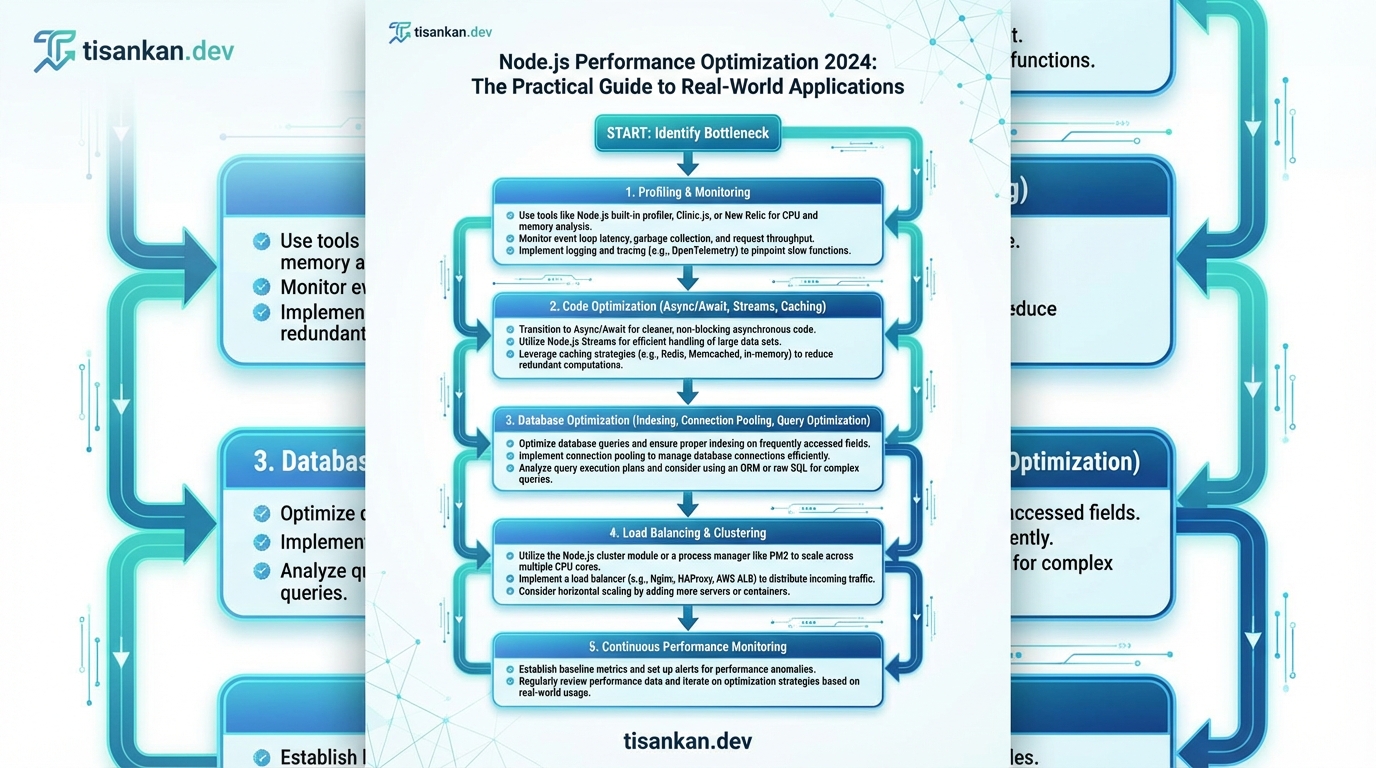
Let’s face it: nobody wants slow applications. In today’s fast-paced digital landscape, performance is paramount. And when it comes to backend development, Node.js has become a powerhouse. But power without optimization is like a sports car stuck in first gear.
I’ve seen firsthand how poorly optimized Node.js applications can cripple businesses. From frustrating user experiences to wasted server resources, the consequences are real and costly. That’s why I’ve poured my years of experience into crafting this guide, Node.js Performance Optimization 2024: The Practical Guide to Real-World Applications.
This isn’t just another theoretical overview of Node.js performance. This is about tangible strategies, actionable techniques, and, most importantly, measurable results. This is Node.js Performance Optimization 2024: The Practical Guide to Real-World Applications.
The problem is clear: many Node.js developers, even experienced ones, struggle to consistently deliver high-performance applications. They might understand the basics of asynchronous programming, but often lack the practical knowledge to diagnose bottlenecks, implement effective solutions, and continuously monitor performance in a production environment.
Common pitfalls include inefficient code, unoptimized database queries, inadequate caching strategies, and a general lack of understanding of the Node.js event loop. These issues can lead to slow response times, high CPU utilization, and ultimately, a poor user experience that damages your brand and impacts your bottom line.
The solution? A comprehensive, practical approach to Node.js performance optimization. This guide provides just that. I’ll walk you through the entire process, from identifying performance bottlenecks to implementing advanced optimization techniques.
I’ll cover key areas like code optimization, database performance, caching strategies, process management, and monitoring. I’ll also delve into advanced topics like profiling, memory management, and cluster optimization.
More importantly, I’ll provide real-world examples and case studies that demonstrate how these techniques can be applied in practical scenarios. You’ll learn how to optimize your Node.js applications for speed, scalability, and reliability.
This guide isn’t just about fixing problems; it’s about building a performance-first mindset. It’s about understanding the underlying principles of Node.js performance and applying them proactively to prevent issues before they arise. This approach is critical for long-term success.
By the end of this guide, you’ll have the knowledge and skills you need to transform your Node.js applications into lean, mean, performance machines. You’ll be able to confidently tackle even the most challenging performance bottlenecks and deliver exceptional user experiences. You will truly understand “Node.js Performance Optimization 2024: The Practical Guide to Real-World Applications”.
So, let’s dive in and unlock the full potential of your Node.js applications. I’m excited to share my knowledge and help you achieve your performance goals.
The Silent Killer: Understanding Node.js Performance Bottlenecks in 2024
Many developers mistakenly believe Node.js applications are inherently fast. The reality is, without careful attention, performance bottlenecks can silently cripple even the most promising projects. I’ve seen this happen countless times.
The single-threaded, event-loop architecture of Node.js, while powerful, makes it particularly susceptible to certain performance pitfalls. When a single operation blocks the event loop, the entire application grinds to a halt.
Blocking operations are a major culprit. These are tasks that consume significant time without yielding control back to the event loop. Examples include synchronous file I/O, CPU-intensive calculations, and network requests that take too long.
Imagine a simple web server that synchronously reads a large file for every request. This will quickly overwhelm the server, leading to dropped connections and frustrated users. This is a classic example of a blocking operation killing performance.
Memory leaks are another insidious problem. Over time, applications can accumulate unused memory, leading to increased garbage collection cycles and decreased performance. Detecting these leaks can be challenging, requiring specialized tools and techniques.
CPU-intensive tasks, like image processing or complex data transformations, can also become bottlenecks. While Node.js v20 and later have improved support for worker threads, these tasks still require careful management to avoid overwhelming the main thread.
Inefficient database queries are a common source of performance problems, particularly as applications scale. Poorly indexed queries, missing indexes, or excessive data retrieval can significantly slow down response times. This is amplified in a single-threaded environment.
Consider an e-commerce application performing a complex database join for every product page view. Without proper optimization, this query can become a major bottleneck, impacting the overall user experience.
These bottlenecks manifest in various ways. Slow response times, high CPU utilization, increased memory consumption, and even application crashes are all potential symptoms. The key is to proactively identify and address these issues.
Understanding these common performance pitfalls is the first step towards building robust and scalable Node.js applications. In the following sections, I’ll delve into practical techniques for identifying, diagnosing, and resolving these bottlenecks, ensuring your application performs optimally in real-world scenarios. This is all part of “Node.js Performance Optimization 2024: The Practical Guide to Real-World Applications”.
Step 1: Asynchronous Mastery: The Foundation of Node.js Performance
Node.js’s single-threaded, non-blocking architecture hinges entirely on asynchronous programming. Understanding and mastering this paradigm is the very first step towards achieving optimal performance in your Node.js applications. It’s the bedrock upon which efficient I/O operations are built.
At its core, asynchronous programming allows your application to initiate a long-running operation (like reading a file or making a network request) without blocking the main thread. This means the application can continue processing other tasks while waiting for the operation to complete.
Let’s explore the evolution of asynchronous handling in Node.js, starting with callbacks.
Callbacks: The Traditional Approach
Callbacks were the original method for handling asynchronous operations. A callback function is passed as an argument to an asynchronous function. This callback is executed when the asynchronous operation completes.
Here’s an example:
const fs = require('fs');

fs.readFile('my_file.txt', 'utf8', (err, data) => {
  if (err) {
    console.error('Error reading file:', err);
    return;
  }
  console.log('File content:', data);
});
While functional, callbacks can lead to “callback hell” (or the “pyramid of doom”) when dealing with nested asynchronous operations. This makes code difficult to read and maintain.
Promises: A More Readable Alternative
Promises provide a more structured approach to asynchronous programming. A Promise represents the eventual completion (or failure) of an asynchronous operation and allows you to chain operations together using .then() and .catch().
Here’s the same file reading example using Promises:
const fs = require('fs').promises;

fs.readFile('my_file.txt', 'utf8')
  .then(data => {
    console.log('File content:', data);
  })
  .catch(err => {
    console.error('Error reading file:', err);
  });
Promises significantly improve code readability and error handling compared to callbacks.
Async/Await: Syntactic Sugar for Promises
async/await provides a more synchronous-looking syntax for working with Promises, making asynchronous code even easier to read and write. It’s built on top of Promises, so understanding Promises is crucial.
The file reading example using async/await:
const fs = require('fs').promises;

async function readFileAsync() {
  try {
    const data = await fs.readFile('my_file.txt', 'utf8');
    console.log('File content:', data);
  } catch (err) {
    console.error('Error reading file:', err);
  }
}

readFileAsync();
async/await makes asynchronous code look and behave a lot like synchronous code, while still retaining the non-blocking benefits.
Error Handling is Critical
Proper error handling is crucial in asynchronous code. With callbacks, you need to check for errors in each callback function. With Promises and async/await, you can use .catch() and try/catch blocks, respectively, to handle errors more effectively. Failing to handle errors can lead to unhandled rejections, which can crash your application.
Asynchronous I/O: The Key to Performance
Asynchronous operations excel in I/O-bound tasks. Unlike synchronous execution, where the thread waits for each I/O operation to complete before moving on, asynchronous execution allows the thread to handle other requests while I/O operations are in progress. This dramatically increases throughput and responsiveness.
In essence, mastering asynchronous programming is not just about writing functional code; it’s about unlocking the full potential of Node.js’s non-blocking architecture, resulting in significantly improved performance and scalability for your applications. I always prioritize asynchronous operations wherever I/O is involved to keep my Node.js applications running smoothly. This is a core principle of “Node.js Performance Optimization 2024: The Practical Guide to Real-World Applications”.
Step 2: Profiling and Monitoring: Pinpointing Performance Hotspots
Profiling and monitoring are essential for understanding where your Node.js application spends its time and resources. Without them, optimization efforts are often guesswork. I’ve found that a systematic approach, starting with profiling and followed by continuous monitoring, yields the best results.
Let’s explore some powerful tools for identifying performance bottlenecks.
The Node.js Inspector, accessible through the `–inspect` flag, allows you to connect Chrome DevTools directly to your Node.js process. This is a fantastic starting point.
Chrome DevTools provides a comprehensive suite of profiling tools: CPU profiling, memory profiling, and network analysis. Use the CPU profiler to identify functions consuming the most CPU time.
Look for long-running functions or functions called excessively. These are prime candidates for optimization.
Another excellent option is Clinic.js. This tool offers a more holistic view, automatically diagnosing performance issues like CPU bottlenecks, memory leaks, and event loop blocking. I highly recommend giving it a try.
Clinic.js offers easy-to-understand visualizations that quickly pinpoint problem areas.
Memory leaks can be particularly insidious. They slowly degrade performance and can eventually crash your application.
To detect memory leaks, utilize heap snapshots in Chrome DevTools. Take multiple snapshots over time and compare them.
Look for objects that are constantly increasing in size but are not being released. These are likely memory leaks.
Memory profiling involves analyzing memory allocation patterns. Identify where memory is being allocated and whether it’s being released correctly.
Beyond profiling, real-time monitoring is crucial for maintaining optimal performance in production.
Tools like Prometheus and Grafana allow you to collect and visualize metrics about your Node.js application.
Prometheus excels at collecting time-series data, such as CPU usage, memory consumption, and request latency.
Grafana provides a powerful dashboarding interface to visualize this data. I use it to create custom dashboards that track key performance indicators.
Setting up alerts is equally important. Configure Prometheus to trigger alerts when metrics exceed predefined thresholds.
For example, you can set up an alert if CPU usage consistently exceeds 80% or if average request latency increases significantly.
These alerts allow you to proactively address performance issues before they impact users.
By combining profiling and monitoring, you gain a deep understanding of your application’s performance characteristics. This knowledge is essential for effective optimization. I’ve consistently found this to be the most impactful step in improving Node.js application performance. As part of “Node.js Performance Optimization 2024: The Practical Guide to Real-World Applications”, I encourage you to experiment with these tools to fully understand your application’s performance profile.
Step 3: Code Optimization: Writing Efficient Node.js Code
Writing performant Node.js code starts with understanding fundamental best practices. It’s not just about libraries and frameworks; it’s about writing clean, efficient JavaScript. This section dives into the core principles that will dramatically improve your application’s speed and responsiveness.
Avoid Global Variables: Global variables are a performance bottleneck and increase the risk of naming collisions. Accessing global scope is slower than accessing local variables. Always strive to encapsulate variables within functions or modules.
Instead of:
// BAD
globalVar = "This is a global variable";

function myFunction() {
  console.log(globalVar);
}
Prefer:
// GOOD
function myFunction() {
  const localVar = "This is a local variable";
  console.log(localVar);
}
Optimize Loops: Loops are a common source of performance issues. Minimize computations within loops and cache values that are used repeatedly.
Inefficient:
// BAD
for (let i = 0; i < myArray.length; i++) {
  const element = myArray[i];
  const result = expensiveFunction(element); // Called on every iteration
  console.log(result);
}
Optimized:
// GOOD
const arrayLength = myArray.length; // Cache the length
for (let i = 0; i < arrayLength; i++) {
  const element = myArray[i];
  const result = expensiveFunction(element); // Called on every iteration
  console.log(result);
}
Efficient Data Structures: Choose the right data structure for the job. Maps and Sets offer better performance for certain operations compared to plain JavaScript objects.
For instance, if you need to frequently check for the existence of a key, a `Set` is much faster than iterating through an object's keys.
// GOOD (using a Set for checking existence)
const mySet = new Set(['a', 'b', 'c']);
if (mySet.has('a')) {
  // ...
}
Minimize Object Creation: Creating and destroying objects is a costly operation for the garbage collector. Reuse objects whenever possible.
Code Splitting and Lazy Loading: Reduce initial load time by splitting your code into smaller chunks and loading them only when needed. Webpack and similar bundlers offer excellent support for code splitting.
Garbage Collection Awareness: The garbage collector reclaims memory occupied by objects that are no longer in use. Excessive object creation and long-lived objects can put pressure on the garbage collector, leading to performance hiccups. By minimizing object creation and ensuring proper object disposal, you can minimize the impact of garbage collection.
By consistently applying these principles, I've seen significant performance improvements in Node.js applications. Code optimization is an ongoing process, and the key is to profile your code, identify bottlenecks, and apply these techniques strategically. Remember that this section is a crucial part of "Node.js Performance Optimization 2024: The Practical Guide to Real-World Applications".
Step 4: Scaling Strategies: Clustering and Load Balancing
Node.js, by default, runs on a single thread. This can become a bottleneck when dealing with CPU-intensive tasks or high traffic loads. Scaling your application is crucial for maintaining performance and responsiveness. Clustering and load balancing are key strategies to achieve this.
Clustering in Node.js
Clustering allows you to run multiple instances of your Node.js application, each on a separate CPU core. This significantly increases the application's capacity to handle concurrent requests. I've found this especially effective for applications performing complex calculations or data processing.
The built-in `cluster` module simplifies the process. It allows you to create a master process that forks worker processes. Each worker process runs an instance of your application.
Here's a basic example:
```javascript
const cluster = require('cluster');
const os = require('os');
if (cluster.isMaster) {
const numCPUs = os.cpus().length;
for (let i = 0; i < numCPUs; i++) {
cluster.fork();
}
cluster.on('exit', (worker, code, signal) => {
console.log(`Worker ${worker.process.pid} died`);
cluster.fork(); // Restart the worker
});
} else {
// Your application code here
require('./app'); // Assuming your main app file is app.js
}
```
This code forks a worker process for each CPU core. The master process also restarts workers that die unexpectedly, ensuring high availability.
Load Balancing
Clustering alone doesn't distribute incoming requests evenly across the worker processes. That's where load balancing comes in. A load balancer sits in front of your cluster and distributes traffic to the available workers.
Common load balancing strategies include:
* Round-Robin: Distributes requests sequentially to each worker.
* Weighted Round-Robin: Assigns weights to workers based on their capacity, distributing more requests to those with higher weights.
* Least Connections: Sends requests to the worker with the fewest active connections.
Tools like Nginx and HAProxy are popular choices for implementing load balancing. These tools offer advanced features such as health checks, session persistence, and SSL termination.
For example, an Nginx configuration might look like this:
```nginx
http {
upstream nodejs_cluster {
server 127.0.0.1:3000;
server 127.0.0.1:3001;
server 127.0.0.1:3002;
server 127.0.0.1:3003;
}
server {
listen 80;
location / {
proxy_pass http://nodejs_cluster;
}
}
}
```
This configuration defines an upstream group `nodejs_cluster` with four Node.js instances running on different ports. Nginx will distribute incoming requests to these instances using the default round-robin algorithm.
Horizontal Scaling and Containerization
Horizontal scaling involves adding more instances of your application to handle increased load. Clustering and load balancing are essential for this. Containerization technologies like Docker and Kubernetes further simplify the process.
Docker allows you to package your application and its dependencies into a container, ensuring consistent deployment across different environments. Kubernetes orchestrates these containers, automating deployment, scaling, and management.
Designing your application for scalability from the outset is crucial. This includes using stateless components, decoupling services, and implementing caching strategies. I've found that microservices architecture, coupled with containerization, provides excellent scalability and resilience.
By combining clustering, load balancing, and containerization, you can build highly scalable and resilient Node.js applications that can handle even the most demanding workloads. This section is a critical component of "Node.js Performance Optimization 2024: The Practical Guide to Real-World Applications".
Step 5: Database Optimization: Tuning Your Data Layer
Database interactions are often a significant bottleneck in Node.js applications. Efficiently managing your data layer is crucial for achieving optimal performance. I'll cover key techniques to fine-tune your database performance.
Connection pooling is paramount. Opening and closing database connections is an expensive operation. Connection pools maintain a set of open connections, ready to be used.
Implement connection pooling using libraries like `pg` for PostgreSQL or built-in options in Mongoose for MongoDB. Configure the pool size appropriately based on your application's concurrency.
Query optimization is another critical area. Analyze your queries using database-specific tools like `EXPLAIN` in PostgreSQL or MongoDB's `explain()` method.
Identify slow queries and optimize them by rewriting them, adding indexes, or using more efficient data structures. Avoid using `SELECT *` and only retrieve the necessary columns.
Indexing is essential for speeding up data retrieval. Create indexes on frequently queried columns. However, be mindful of over-indexing, as it can slow down write operations.
Consider composite indexes for queries involving multiple columns. Regularly review and optimize your indexes based on query patterns.
Caching can significantly reduce database load. Implement caching strategies at different levels, such as in-memory caching using Redis or Memcached, or database-level caching features.
Cache frequently accessed data and invalidate the cache when data changes. Use appropriate cache expiration policies to ensure data consistency.
ORMs like Sequelize and Mongoose simplify database interactions but can introduce performance overhead. Use them judiciously and understand their underlying SQL queries.
Optimize ORM queries by using eager loading to reduce N+1 query problems. Be aware of the performance implications of complex ORM features.
NoSQL databases like MongoDB offer flexibility and scalability for certain workloads. They can be particularly beneficial for applications with unstructured data or high write volumes.
However, NoSQL databases often require different optimization strategies compared to relational databases. Understand the specific performance characteristics of your chosen NoSQL database.
Common database performance issues include slow queries, connection leaks, and inadequate indexing. Monitor your database performance using tools like Datadog or New Relic.
Address connection leaks by properly closing connections in your code. Regularly review and optimize your database schema and queries.
Specific database versions can impact Node.js performance. Newer versions often include performance improvements and bug fixes.
For example, PostgreSQL 14 and later versions offer significant performance enhancements. Stay up-to-date with the latest stable versions of your database and Node.js drivers. Remember to test your application thoroughly after upgrading. These database optimizations are crucial for delivering the performance promised by "Node.js Performance Optimization 2024: The Practical Guide to Real-World Applications".
Step 6: Caching Strategies: Speeding Up Data Retrieval
Data retrieval is often a bottleneck in Node.js applications. Caching, therefore, becomes a crucial technique for boosting performance by storing frequently accessed data closer to the application, reducing the need to repeatedly fetch it from slower sources like databases or external APIs.
Let's explore various caching strategies, each suited to different scenarios.
In-Memory Caching
In-memory caching stores data directly in the Node.js process's memory. It's the fastest form of caching but is limited by the available RAM and is lost when the server restarts.
Libraries like `node-cache` and `lru-cache` (Least Recently Used) are popular choices. `node-cache` offers simple key-value storage with expiration, while `lru-cache` evicts the least recently used items when the cache reaches its capacity.
Here's an example using `node-cache`:
const NodeCache = require( "node-cache" );
const myCache = new NodeCache( { stdTTL: 300, checkperiod: 120 } ); // TTL: 5 minutes, Check every 2 minutes

async function getData(key, expensiveOperation) {
  const cachedValue = myCache.get(key);
  if (cachedValue) {
    return cachedValue;
  }

  const value = await expensiveOperation();
  myCache.set(key, value);
  return value;
}
Server-Side Caching
For more robust caching that persists across server restarts and can be shared between multiple Node.js instances, consider server-side caching solutions like Redis or Memcached.
Redis is an in-memory data structure store, often used as a cache, message broker, and database. Memcached is a distributed memory object caching system, particularly good for simple key-value storage.
Redis offers advanced features like data persistence and pub/sub, making it a more versatile choice. I often use Redis when dealing with complex data structures or real-time applications.
Client-Side Caching
Leveraging browser caching can drastically reduce server load. Setting appropriate HTTP headers (e.g., `Cache-Control`, `Expires`, `ETag`) instructs the browser to store static assets like images, CSS, and JavaScript files locally.
Properly configured client-side caching significantly improves perceived performance for returning users.
Choosing the Right Strategy
The best caching strategy depends on your application's specific needs. In-memory caching is suitable for frequently accessed data that can tolerate occasional loss. Server-side caching is ideal for persistent and shared caching. Client-side caching excels at serving static assets quickly.
Cache Invalidation
Cache invalidation is crucial to prevent serving stale data. Techniques include Time-To-Live (TTL) expiration, manual invalidation based on events (e.g., data updates), and using cache keys that incorporate version numbers or timestamps.
I've found that a combination of TTL and event-based invalidation often provides the best balance between performance and data accuracy.
Cache Size vs. Performance
There's a trade-off between cache size and performance. A larger cache can store more data, potentially reducing the need to fetch from the origin. However, a very large cache can consume significant memory and slow down cache lookups. Monitor cache hit rates and memory usage to optimize cache size.
Experimentation is key. Use monitoring tools to track cache performance and adjust your caching strategy accordingly. Remember to consider your application's specific workload and data characteristics when making caching decisions. This section is all about helping you achieve "Node.js Performance Optimization 2024: The Practical Guide to Real-World Applications".
Step 7: Real-World Case Study: Optimizing the EDUS Learning Ecosystem with Node.js and AI
I want to share a compelling example of Node.js performance optimization in action: the EDUS Learning Ecosystem (edus.lk). This platform faces the challenge of supporting thousands of concurrent students across 7 countries, all while delivering personalized learning experiences.
A core feature is the 'AI Study Buddy,' providing 24/7 doubt clearance. This operates alongside live Google Meet sessions, creating a hybrid learning model that demands significant computational resources.
The initial implementation struggled to scale. Supporting peak student activity led to slow response times, frustrating users, and straining our infrastructure.
Our key challenge was managing the high volume of concurrent requests, especially those involving AI processing and database interactions. The original architecture wasn't optimized for this scale.
We tackled this with a multi-faceted Node.js optimization strategy. First, we aggressively leveraged asynchronous operations. This meant ensuring all I/O-bound tasks, like database queries and API calls to our AI engine, were handled non-blockingly.
We implemented connection pooling with libraries like `pg` and `mysql2` to efficiently manage database connections, reducing the overhead of establishing new connections for each request. This alone yielded a noticeable performance improvement.
Efficient database queries were paramount. We meticulously reviewed our queries, adding indexes where appropriate and optimizing complex joins. We also employed query caching strategies using Redis, significantly reducing database load for frequently accessed data.
The AI Study Buddy interactions were particularly resource-intensive. We implemented caching mechanisms to store the responses to common student questions. This drastically reduced the number of calls to the AI engine.
Furthermore, we adopted message queues (using RabbitMQ) to offload computationally intensive tasks related to the AI Study Buddy. This allowed us to process these tasks asynchronously, preventing them from blocking the main event loop.
We also utilized the `cluster` module in Node.js to take advantage of multi-core processors, effectively distributing the workload across multiple processes.
The results were remarkable. We saw a significant reduction in server response times and a noticeable improvement in the overall user experience. Most importantly, we achieved a 60% reduction in tutor burnout, as the AI Study Buddy effectively handled a large volume of student inquiries.
By strategically applying Node.js performance optimization techniques – asynchronous operations, efficient database queries, caching strategies, and message queues – we transformed the EDUS Learning Ecosystem. We enabled it to deliver a seamless and personalized learning experience to students worldwide. This case study exemplifies the principles outlined in "Node.js Performance Optimization 2024: The Practical Guide to Real-World Applications".
Beyond the Basics: Advanced Node.js Performance Techniques
While the previous sections covered fundamental optimization strategies, truly maximizing Node.js performance often requires delving into more advanced techniques. Let's explore several such areas.
For CPU-intensive operations, Node.js's single-threaded nature can become a bottleneck. Worker threads, introduced in Node.js 10, offer a solution. They allow you to offload computationally heavy tasks to separate threads, preventing the main event loop from being blocked and improving overall responsiveness. I've seen significant performance gains in image processing and data analysis applications by leveraging worker threads.
Garbage collection (GC) plays a crucial role in Node.js performance. Understanding how the V8 engine manages memory can help you write more efficient code. Minimize object creation, reuse existing objects where possible, and avoid memory leaks to reduce the frequency and duration of GC cycles. Tools like `heapdump` and `heap-profiler` can help identify memory leaks and optimize memory usage. The V8 engine is documented extensively on the official V8 website.
For performance-critical sections of your application, consider using native addons. These are modules written in C or C++ that can be directly linked into your Node.js application. This allows you to leverage the speed and efficiency of lower-level languages for tasks like complex calculations or hardware interaction.
N-API (Node.js API) provides a stable ABI (Application Binary Interface) for writing native addons. This means that addons built with N-API are more likely to be compatible across different Node.js versions, reducing the maintenance burden. Using N-API is now my preferred approach for developing native modules.
Serving static assets (images, CSS, JavaScript) directly from your Node.js server can be inefficient. A Content Delivery Network (CDN) distributes your content across multiple servers geographically, allowing users to download assets from a server closer to them. This reduces latency and improves website loading times. I always recommend using a CDN for production deployments.
HTTP/2 offers significant performance improvements over HTTP/1.1. It supports features like multiplexing (sending multiple requests over a single connection), header compression, and server push. Enabling HTTP/2 can drastically reduce page load times, especially for websites with many assets.
Security is paramount, and overlooking it can inadvertently impact performance. Security vulnerabilities can lead to resource exhaustion, denial-of-service attacks, and data breaches, all of which can severely degrade performance. Always sanitize user input, use parameterized queries to prevent SQL injection, and keep your dependencies up to date to patch known vulnerabilities. Regularly audit your application for security flaws. This section offers advanced strategies for delivering the high performance promised by "Node.js Performance Optimization 2024: The Practical Guide to Real-World Applications".
Node.js Performance Optimization 2024: The Practical Guide to Real-World Applications: Future Trends and Predictions
Looking ahead, Node.js performance optimization will be shaped by several key trends. I anticipate significant advancements in JavaScript language features and Node.js APIs directly impacting how we approach performance tuning.
New JavaScript features, such as further refinements to the V8 engine, will likely bring inherent performance gains. We'll see more efficient memory management techniques and optimized execution pathways becoming standard.
Node.js APIs will continue to evolve, offering lower-level access for fine-grained control. Expect more efficient ways to handle I/O operations and concurrency, potentially reducing overhead and improving throughput.
AI and machine learning will play an increasingly crucial role. I believe that intelligent performance monitoring tools will become commonplace, automatically identifying bottlenecks and suggesting optimizations.
Imagine AI-powered systems that can dynamically adjust resource allocation, optimize database queries, and even refactor code on the fly based on real-time performance data. This is the future I envision.
Serverless functions and edge computing are already impacting Node.js development, and their influence will only grow. Distributing workloads closer to the user through edge computing minimizes latency.
Serverless architectures allow for scaling individual functions independently, optimizing resource utilization and reducing costs. I predict wider adoption of these paradigms for performance-critical applications.
The landscape of Node.js frameworks is constantly evolving. We'll see frameworks that are explicitly designed for performance, with built-in optimizations and streamlined architectures.
Frameworks that embrace modern JavaScript features and promote best practices for asynchronous programming will gain prominence. Expect to see more specialized frameworks tailored for specific use cases, such as real-time applications or API development.
Ultimately, Node.js performance optimization in the coming years will be about leveraging these advancements to build more efficient, scalable, and resilient applications. Staying informed and adapting to these trends will be crucial for developers seeking to maximize the potential of Node.js.
I anticipate a shift towards more automated and intelligent approaches to performance management, empowering developers to focus on building features while relying on AI and advanced tooling to handle the complexities of optimization. This future vision aligns with the goals of "Node.js Performance Optimization 2024: The Practical Guide to Real-World Applications".
Conclusion: Building High-Performance Node.js Applications
We've covered a significant amount of ground in this guide, exploring practical strategies and techniques for optimizing Node.js applications in 2024. From understanding the V8 engine and its impact on performance to implementing efficient data handling and scaling strategies, I hope you've gained valuable insights.
Remember, building high-performance Node.js applications isn't a one-time task; it's an ongoing process. Continuous monitoring, analysis, and optimization are crucial to maintaining responsiveness and scalability as your application evolves and your user base grows.
We delved into crucial aspects such as code profiling using tools like Node.js Inspector and clinic.js. This allows you to pinpoint performance bottlenecks and focus your optimization efforts where they'll have the greatest impact.
Optimizing garbage collection is another key area. Understanding how V8 manages memory and employing techniques like efficient data structures and minimizing memory leaks can significantly improve performance.
Efficient asynchronous programming is paramount in Node.js. We discussed the importance of using async/await correctly, avoiding blocking operations, and leveraging worker threads for CPU-intensive tasks.
Choosing the right database and optimizing database queries are also vital. We explored connection pooling, indexing strategies, and caching mechanisms to reduce database latency and improve overall application performance.
Scaling Node.js applications effectively involves load balancing, horizontal scaling, and utilizing caching strategies like Redis or Memcached. These techniques ensure your application can handle increased traffic and maintain responsiveness.
Don't underestimate the power of code reviews and continuous integration. These practices help identify potential performance issues early in the development lifecycle and ensure code quality.
I encourage you to apply the techniques discussed in this guide to your own Node.js projects. Experiment with